0. 서론
- 같은 코드와 프롬프트로 Ask 모드와 Agent 모드를 비교했다
- 토큰 사용량 차이와, VSCode에서 이를 외국어 공부에 활용하는 방법까지 정리했다
1. AI 사용할 때, Ask vs. Agent
- Ask Mode: 단일 질문에 대한 일회선 답변에 초점
- Agent Mode: 사용자가 목표를 말하면, AI가 플랜을 세우고 여러 단계를 자율적으로 실행하는 모드
- 빠르게 한 번 물어볼 때는 Ask 모드(검색 느낌).
- 파일 수정이나 여러 단계 작업은 Agent 모드(비서 느낌).
- 이 글은 VSCode에서 GitHub Copilot Chat과 Gemini API를 사용할 때를 기준으로 작성했다.
2. 실험 설정: 동일 코드에 동일한 Prompt
“간단한 리스트 필터링 코드를 List Comprehension 으로 바꾸는 예제 코드”
# 사용자 데이터 리스트 (raw_data)
users = [
    {"id": 1, "name": "Alice", "role": "admin", "is_active": True},
    {"id": 2, "name": "Bob", "role": "user", "is_active": False},
    {"id": 3, "name": "Charlie", "role": "user", "is_active": True},
    {"id": 4, "name": "David", "role": "guest", "is_active": True},
]

# 관리자(admin)이거나 활성(active) 상태인 유저의 이름만 대문자로 추출하는 로직
target_users = []
<선택부분>
for user in users:
    if user["is_active"] and user["role"] != "guest":
        processed_name = user["name"].upper()
        target_users.append(processed_name) </선택부분>

print(target_users)“이 코드를 바꾸게 하는 Prompt”
지금 선택한 코드를 python의 list comprehension 문법으로 바꿔줘.flowchart LR
A["VSCode<br/>Developer"] -->|"HTTP 요청 (OpenAI 호환)"| B["LiteLLM Proxy<br/>Request Capture · Logging"]
B -->|"변환 및 포워딩"| C["Gemini API<br/>Google AI"]
C -->|"응답 반환"| B
B -->|"HTTP 응답"| AVSCode와 Gemini API 사이에 LLM Proxy를 두고, 두 사이의 HTTP 요청·응답을 MITM처럼 캡처하도록 구성했다. 이 구조 덕분에 Ask 모드와 Agent 모드의 요청/응답을 캡쳐해서, 어떤 토큰이 어디에 얼마나 쓰이는지 비교 할 수 있다.
3. 실험결과
3.1 Ask 모드

ASK 모드에서 사용된 토큰 사용량
Total: 5,505(Message: 5371/ Response: 134)
질문은 한 줄이지만, VSCode에서 사용하는 Function 리스트와 설명이 함께 보내지면서 Message 토큰이 5,371까지 늘어났다.
클릭 – 실제 function 정의 중 일부. 이런 정의가 여러 개 붙어서 Message 길이가 크게 늘어난다.
“type”: “function”,
“function”: {
“name”: “grep_search”,
“parameters”: {
“type”: “object”,
“required”: [
“query”,
“isRegexp”
],
“properties”: {
“query”: {
전체 Request
{
  "n": 1,
  "model": "gemini/gemini-2.5-flash",
  "tools": [
    {
      "type": "function",
      "function": {
        "name": "file_search",
        "parameters": {
          "type": "object",
          "required": [
            "query"
          ],
          "properties": {
            "query": {
              "type": "string",
              "description": "Search for files with names or paths matching this glob pattern."
            },
            "maxResults": {
              "type": "number",
              "description": "The maximum number of results to return. Do not use this unless necessary, it can slow things down. By default, only some matches are returned. If you use this and don't see what you're looking for, you can try again with a more specific query or a larger maxResults."
            }
          }
        },
        "description": "Search for files in the workspace by glob pattern. This only returns the paths of matching files. Use this tool when you know the exact filename pattern of the files you're searching for. Glob patterns match from the root of the workspace folder. Examples:\n- **/*.{js,ts} to match all js/ts files in the workspace.\n- src/** to match all files under the top-level src folder.\n- **/foo/**/*.js to match all js files under any foo folder in the workspace."
      }
    },
    {
      "type": "function",
      "function": {
        "name": "grep_search",
        "parameters": {
          "type": "object",
          "required": [
            "query",
            "isRegexp"
          ],
          "properties": {
            "query": {
              "type": "string",
              "description": "The pattern to search for in files in the workspace. Use regex with alternation (e.g., 'word1|word2|word3') or character classes to find multiple potential words in a single search. Be sure to set the isRegexp property properly to declare whether it's a regex or plain text pattern. Is case-insensitive."
            },
            "isRegexp": {
              "type": "boolean",
              "description": "Whether the pattern is a regex."
            },
            "maxResults": {
              "type": "number",
              "description": "The maximum number of results to return. Do not use this unless necessary, it can slow things down. By default, only some matches are returned. If you use this and don't see what you're looking for, you can try again with a more specific query or a larger maxResults."
            },
            "includePattern": {
              "type": "string",
              "description": "Search files matching this glob pattern. Will be applied to the relative path of files within the workspace. To search recursively inside a folder, use a proper glob pattern like \"src/folder/**\". Do not use | in includePattern."
            },
            "includeIgnoredFiles": {
              "type": "boolean",
              "description": "Whether to include files that would normally be ignored according to .gitignore, other ignore files and `files.exclude` and `search.exclude` settings. Warning: using this may cause the search to be slower. Only set it when you want to search in ignored folders like node_modules or build outputs."
            }
          }
        },
        "description": "Do a fast text search in the workspace. Use this tool when you want to search with an exact string or regex. If you are not sure what words will appear in the workspace, prefer using regex patterns with alternation (|) or character classes to search for multiple potential words at once instead of making separate searches. For example, use 'function|method|procedure' to look for all of those words at once. Use includePattern to search within files matching a specific pattern, or in a specific file, using a relative path. Use 'includeIgnoredFiles' to include files normally ignored by .gitignore, other ignore files, and `files.exclude` and `search.exclude` settings. Warning: using this may cause the search to be slower, only set it when you want to search in ignored folders like node_modules or build outputs. Use this tool when you want to see an overview of a particular file, instead of using read_file many times to look for code within a file."
      }
    },
    {
      "type": "function",
      "function": {
        "name": "get_changed_files",
        "parameters": {
          "type": "object",
          "properties": {
            "repositoryPath": {
              "type": "string",
              "description": "The absolute path to the git repository to look for changes in. If not provided, the active git repository will be used."
            },
            "sourceControlState": {
              "type": "array",
              "items": {
                "enum": [
                  "staged",
                  "unstaged",
                  "merge-conflicts"
                ],
                "type": "string"
              },
              "description": "The kinds of git state to filter by. Allowed values are: 'staged', 'unstaged', and 'merge-conflicts'. If not provided, all states will be included."
            }
          }
        },
        "description": "Get git diffs of current file changes in a git repository. Don't forget that you can use run_in_terminal to run git commands in a terminal as well."
      }
    },
    {
      "type": "function",
      "function": {
        "name": "list_code_usages",
        "parameters": {
          "type": "object",
          "required": [
            "symbolName"
          ],
          "properties": {
            "filePaths": {
              "type": "array",
              "items": {
                "type": "string"
              },
              "description": "One or more file paths which likely contain the definition of the symbol. For instance the file which declares a class or function. This is optional but will speed up the invocation of this tool and improve the quality of its output."
            },
            "symbolName": {
              "type": "string",
              "description": "The name of the symbol, such as a function name, class name, method name, variable name, etc."
            }
          }
        },
        "description": "Request to list all usages (references, definitions, implementations etc) of a function, class, method, variable etc. Use this tool when \n1. Looking for a sample implementation of an interface or class\n2. Checking how a function is used throughout the codebase.\n3. Including and updating all usages when changing a function, method, or constructor"
      }
    },
    {
      "type": "function",
      "function": {
        "name": "list_dir",
        "parameters": {
          "type": "object",
          "required": [
            "path"
          ],
          "properties": {
            "path": {
              "type": "string",
              "description": "The absolute path to the directory to list."
            }
          }
        },
        "description": "List the contents of a directory. Result will have the name of the child. If the name ends in /, it's a folder, otherwise a file"
      }
    },
    {
      "type": "function",
      "function": {
        "name": "read_file",
        "parameters": {
          "type": "object",
          "required": [
            "filePath"
          ],
          "properties": {
            "limit": {
              "type": "number",
              "description": "Optional: the maximum number of lines to read. Only use this together with `offset` if the file is too large to read at once."
            },
            "offset": {
              "type": "number",
              "description": "Optional: the 1-based line number to start reading from. Only use this if the file is too large to read at once. If not specified, the file will be read from the beginning."
            },
            "filePath": {
              "type": "string",
              "description": "The absolute path of the file to read."
            }
          }
        },
        "description": "Read the contents of a file. Line numbers are 1-indexed. This tool will truncate its output at 2000 lines and may be called repeatedly with offset and limit parameters to read larger files in chunks."
      }
    },
    {
      "type": "function",
      "function": {
        "name": "semantic_search",
        "parameters": {
          "type": "object",
          "required": [
            "query"
          ],
          "properties": {
            "query": {
              "type": "string",
              "description": "The query to search the codebase for. Should contain all relevant context. Should ideally be text that might appear in the codebase, such as function names, variable names, or comments."
            }
          }
        },
        "description": "Run a natural language search for relevant code or documentation comments from the user's current workspace. Returns relevant code snippets from the user's current workspace if it is large, or the full contents of the workspace if it is small."
      }
    },
    {
      "type": "function",
      "function": {
        "name": "search_workspace_symbols",
        "parameters": {
          "type": "object",
          "required": [
            "symbolName"
          ],
          "properties": {
            "symbolName": {
              "type": "string",
              "description": "The symbol to search for, such as a function name, class name, or variable name."
            }
          }
        },
        "description": "Search the user's workspace for code symbols using language services. Use this tool when the user is looking for a specific symbol in their workspace."
      }
    }
  ],
  "top_p": 1,
  "stream": true,
  "messages": [
    {
      "role": "system",
      "content": "You are an expert AI programming assistant, working with a user in the VS Code editor.\nWhen asked for your name, you must respond with \"GitHub Copilot\". When asked about the model you are using, you must state that you are using gemini/gemini-2.5-flash.\nFollow the user's requirements carefully & to the letter.\nFollow Microsoft content policies.\nAvoid content that violates copyrights.\nIf you are asked to generate content that is harmful, hateful, racist, sexist, lewd, or violent, only respond with \"Sorry, I can't assist with that.\"\nKeep your answers short and impersonal.\n<instructions>\nYou are a highly sophisticated automated coding agent with expert-level knowledge across many different programming language... (litellm_truncated skipped 7533 chars) ...\nThe function `calculateTotal` is defined in `lib/utils/math.ts`.\nYou can find the configuration in `config/app.config.json`.\n</example>\nUse KaTeX for math equations in your answers.\nWrap inline math equations in $.\nWrap more complex blocks of math equations in $$.\n\n</outputFormatting>\n\n<instructions>\n<attachment filePath=\"/home/flywithu/.aitk/instructions/tools.instructions.md\">\n---\ndescription: AI Toolkit provides tools for AI/Agent app development\napplyTo: '**'\n---\n- `aitk-get_agent_code_gen_best_practices` - best practices, guidance and steps for any AI Agent development\n- `aitk-get_tracing_code_gen_best_practices` - best practices for code generation and operations when working with tracing for AI applications\n- `aitk-get_ai_model_guidance` - guidance and best practices for using AI models\n- `aitk-evaluation_planner` - guides users through clarifying evaluation metrics and test dataset via multi-turn conversation, call this first when evaluation metrics are unclear\n- `aitk-get_evaluation_code_gen_best_practices` - best practices for the evaluation code generation when working on evaluation for AI application or AI agent\n- `aitk-evaluation_agent_runner_best_practices` - best practices and guidance for using agent runners to collect responses from test datasets for evaluation\n\n</attachment>\n\n</instructions>"
    },
    {
      "role": "user",
      "content": "<environment_info>\nThe user's current OS is: Linux\n</environment_info>\n<workspace_info>\nI am working in a workspace with the following folders:\n- /home/flywithu/git/ocr_python \nI am working in a workspace that has the following structure:\n```\n-\naccident_gps.py\nandroid_get_screen.py\narrow.py\ncls_same_local.yaml\ncoupang_list.py\ncrop_and_save.py\ndclick.py\nerror_button.py\ngen_sLLM_data.py\ngeo_fix_out.txt\nget_sLLM_data_v3.py\nget_sLLM_yesdata.py\nget_xml.py\ngogofix.txt\ngpdatato.py\ngrap_oneline.py\nhighway.py\njson_gui.py\nkr_geo_fix_script.txt\nllm_test.py\nlora_merge.py\nmedical_rename.py\nmelon_go.py\nmerge_qwen_vl_gguf.py\nmissing_files.py\nModelfile\nmygo.py\nmyrefgo_10sec_gradual50.txt\nmyrefgo_absolute_pattern.txt\nmyrefg... (litellm_truncated skipped 380 chars) ...ta.txt\nrequirements.txt\nroutine.py\nsampled_geofix.txt\nshortcha_go.py\nshortcha_go2.py\nshortcha.py\nsllm_ollama_test.py\nsllm_trained.py\nsslm_test_webui.py\ntest_ocr.py\ntest_screen.py\ntest.py\ntest2.py\ntinyllama_sllm.gguf\ntmap_go.py\ntrain_data_sllm_keymatch.jsonl\ntrain_data_sllm_v2.jsonl\ntrain_data_sllm_v3.jsonl\ntrain_data_sllm_yes_only.jsonl\ntrain_dataset_qwen_item1.jsonl\ntrain_dataset_qwen.jsonl\ntrain_dataset_qwen.jsonl.bak\nvlm_dataset_2.py\nvlm_dataset.jsonl\nvlm_image_comp.py\nvlm_jsonl_compare.py\nvlm_jsonl_fine.py\nvlm_make_dataset.py\nvlm_merged.py\nvlm_qwen_myin.py\nvlm_qwen_unsloth.py\nvlm_qwenly_in.py\nvlm_qwenvl.py\nvlm_test.py\nvlm_train_qwen_go.py\nvlm_train_qwen3.py\nwordpress_post_5622_backup_20251122_214920.html\nwordpress_post_5622_backup_20251122_215223.html\nwordpress_post_5622_backup_20251122_215539.html\nwordpress_post_5622_backup_20251122_220256.html\nwordpress_post_5622_backup_20251122_220616.html\nwordpress_post_5622_backup_20251122_221240.html\nxbutton.py\nxml_20251118_182136.xml\nxml_20251118_182150.xml\nxml-rpc_test.py\nyolo_go.py\nyolo_test.py\nyolo11n-cls.pt\nyolov3u.onnx\nyolov3u.pt\nyolov8n.pt\nyolov8s.onnx\nyolov8s.pt\n...\n```\nThis is the state of the context at this point in the conversation. The view of the workspace structure may be truncated. You can use tools to collect more context if needed.\n</workspace_info>"
    },
    {
      "role": "user",
      "content": "<attachments>\n<attachment id=\"file:llm_test.py\">\nUser's active selection:\nExcerpt from llm_test.py, lines 12 to 15:\n```python\nfor user in users:\n    if user[\"is_active\"] and user[\"role\"] != \"guest\":\n        processed_name = user[\"name\"].upper()\n        target_users.append(processed_name)\n```\n</attachment>\n<attachment filePath=\"/home/flywithu/git/ocr_python/llm_test.py\">\nUser's active file for additional context:\n# 사용자 데이터 리스트 (raw_data)\nusers = [\n    {\"id\": 1, \"name\": \"Alice\", \"role\": \"admin\", \"is_active\": True},\n    {\"id\": 2, \"name\": \"Bob\", \"role\": \"user\", \"is_active\": False},\n    {\"id\": 3, \"name\": \"Charlie\", \"role\": \"user\", \"is_active\": True},\n    {\"id\": 4, \"name\": \"David\", \"role\": \"guest\", \"is_active\": True},\n]\n\n# 관리자(admin)이거나 활성(active) 상태인 유저의 이름만 대문자로 추출하는 로직\ntarget_users = []\n\nfor user in users:\n    if user[\"is_active\"] and user[\"role\"] != \"guest\":\n        processed_name = user[\"name\"].upper()\n        target_users.append(processed_name)\n\nprint(target_users)\n</attachment>\n\n</attachments>\n<context>\nThe current date is December 20, 2025.\n</context>\n<editorContext>\nThe user's current file is /home/flywithu/git/ocr_python/llm_test.py. The current selection is from line 12 to line 15.\n</editorContext>\n<reminderInstructions>\n\n</reminderInstructions>\n<userRequest>\n지금 선택한 코드를 python의 list comprehension 문법으로 바꿔줘.\n</userRequest>"
    }
  ],
  "stream_options": {
    "include_usage": true
  },
  "max_completion_tokens": 4096
}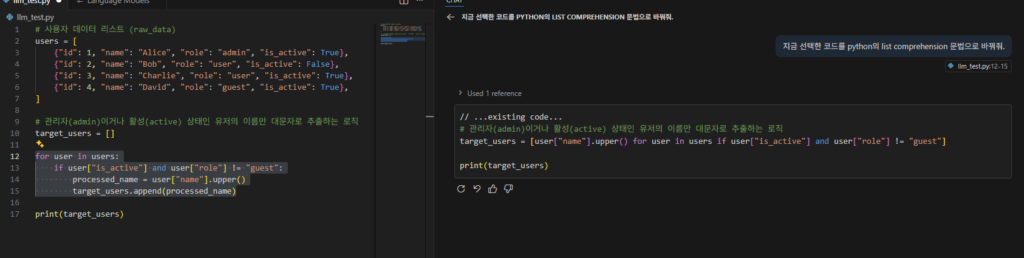
ASK 모드의 결과는 화면에 ‘이렇게 수정하세요’라고 알려 줍니다.
3.2 Agent 모드

Agent 모드에서 사용된 토큰 사용량
Total: 29,323. 2번의 통신이 발생한다.
– 각 요청에서 Message 토큰이 1만 4천 개 이상이라, Ask 모드 대비 약 5~6배 수준까지 늘어 난다.
그러면 Request 는 무엇이 있었을까?
    {
      "type": "function",
      "function": {
        "name": "replace_string_in_file",
        "parameters": {
          "type": "object",
          "required": [
            "filePath",
            "oldString",
            "newString"
          ],
          "properties": {
            "filePath": {
              "type": "string",
              "description": "An absolute path to the file to edit."
            },
            "newString": {
              "type": "string",
              "description": "The exact literal text to replace `old_string` with, preferably unescaped. Provide the EXACT text. Ensure the resulting code is correct and idiomatic."
            },
            "oldString": {
              "type": "string",
              "description": "The exact literal text to replace, preferably unescaped. For single replacements (default), include at least 3 lines of context BEFORE and AFTER the target text, matching whitespace and indentation precisely. For multiple replacements, specify expected_replacements parameter. If this string is not the exact literal text (i.e. you escaped it) or does not match exactly, the tool will fail."
            }
          }
        },
        "description": "This is a tool for making edits in an existing file in the workspace. For moving or renaming files, use run in terminal tool with the 'mv' command instead. For larger edits, split them into smaller edits and call the edit tool multiple times to ensure accuracy. Before editing, always ensure you have the context to understand the file's contents and context. To edit a file, provide: 1) filePath (absolute path), 2) oldString (MUST be the exact literal text to replace including all whitespace, indentation, newlines, and surrounding code etc), and 3) newString (MUST be the exact literal text to replace \\`oldString\\` with (also including all whitespace, indentation, newlines, and surrounding code etc.). Ensure the resulting code is correct and idiomatic.). Each use of this tool replaces exactly ONE occurrence of oldString.\n\nCRITICAL for \\`oldString\\`: Must uniquely identify the single instance to change. Include at least 3 lines of context BEFORE and AFTER the target text, matching whitespace and indentation precisely. If this string matches multiple locations, or does not match exactly, the tool will fail. Never use 'Lines 123-456 omitted' from summarized documents or ...existing code... comments in the oldString or newString."
      }
},Request 정보를 보면 이렇게 Function List 가 여러개 보낸다. 각 Tool에 대한 설명까지 매우 자세하게 포함되면서, Tool 수가 늘어날수록 Message 토큰도 함께 증가한다. ASK모드보다 Agent 모드에서 Function 리스트와 Tool 관련 메타데이터가 더 자세하게 포함되면서 Message 토큰이 폭발적으로 늘어난다.
  "object": "chat.completion",
  "choices": [
    {
      "index": 0,
      "message": {
        "role": "assistant",
        "content": null,
        "tool_calls": [
          {
            "id": "call_6243bdea334749199b9842844b23",
            "type": "function",
            "function": {
              "name": "replace_string_in_file",
              "arguments": "{\"filePath\": \"/home/flywithu/git/ocr_python/llm_test.py\", \"newString\": \"target_users = [user[\\\"name\\\"].upper() for user in users if user[\\\"is_active\\\"] and user[\\\"role\\\"] != \\\"guest\\\"]\", \"oldString\": \"for user in users:\\n    if user[\\\"is_active\\\"] and user[\\\"role\\\"] != \\\"guest\\\":\\n        processed_name = user[\\\"name\\\"].upper()\\n        target_users.append(processed_name)\"}"
            },
            "provider_specific_fields": {
              "thought_signature": "CiQBcsjafE06ib5z0NgHuEm+WY1wygDRcnrmHWFnWgJkp4KtiH8KdQFyyNp8jLxTl6X2vtxzUwc8j6eRxONku6GT+HJViNgYky528d5ih4MSbJ2A/0wa9h1YcFYJZ2hQ4EkFkpvs+ITI5ynM4ZRZwBEbPXu/iWann2vz0HV5wEQUAcSJVcx0wzPTlfHZHEqMQ5AU0+flUdHtRnHOrwruAQFyyNp8DXGCIzdz9D/ayBm26TQ3ycUS0ij+jH8uTFM3unCvqQXLgsVzWiX279A/dffzriS9IjLzXz8hjoKp01evdKF+ZuzAVjscyHPQVjaXqMXV/MC2P5z9+QLV14wNhu3w1Ppb5YBI9BwvIRsXfsKEmol1YrW1eSuBdq4NTrvv/mjPSEmX/NVql58mnrWNFRtpNgqU/FMAM0GvWyC7wrInbRljgsarfkM5R+8ClLXV841/hG8qWO23fdleHcBasUjY1JUbS4OkyByvR6qBL9KNRgI44kXJ0NbgZRSKhxXTZDSyDmhjtb9XEBbHYqQK5gEBcsjafMP1ksRBj1uJHEEeeNfSOmoM4Gf/ml7Y91uzj/TDbGLbHdQG4PEIpFfvdHCuYHA/znfvVKg5t4xm5rf+GQsXIWN6sPY3RG9ZIVzp/YW68Vu9cv5qV2Gc7SWaz9eUYMx55yaWg5G0SFoygnI+Q8jRUFwrRpez3B2JLR7v5nYy/XikXEmoStv+rkjtOs9vpQ4y6H7xMGAEeOyEIWdx4BECTHwdPLOzh190eCbDMaXj4wRcAJrXKyQIj1ZyZ5IlbxIHvJOz0PEyICuIUBHaS/AXXTEwlAmMZR3tbtvBcydKAZLH6grEAQFyyNp8j/q4IDjfidJRQeIsUO/VwuVATK8lJ6J2MT2p7Jrr5dSivTe3e7ahof/cLHGeC906tPxXXhhv7+VMfJWk54kNCEAF60VnZfKIL5jA0cyXc6ClMrWxs6INrPw1/8uhlkqR9xUu05L45ivW+UFk0/MY6mjRPXavVBBWDY11ylB5PvIwFRxsHUZroyX17Do6wERNOFOiTDyi2EUH6R7Xnx2aqQhV3hBQ7qSNTd7WkF5K1jG6rTJAYvpjmzdckhdXwYUKxwEBcsjafHPifkG/Nkxlejcfy+JauU/fNBEMAn8s2mDWmH1AXrx0ZykvZsz4CEZIjZaD5RgWJtrWE/RVwzE4pyFr87XT3Zl4WPrQFoNzOdi860mvYJ0zwheqPYN1XA5/OTjE/ahImxw9hLS0kng97Ekwc8tDZexLG3jy/xRBrqZalWnhtu+fpOl8ZfHngiRRdWbxSF+9KeazYleBnF0uIlxmQt9YS1Jcxb14FdYpI3yDv3x3iPqa6OMzKjKKi3LO1gSdAzYHQd+8CjkBcsjafKslQ0lmKDhX1X4xBSkpZJOhD9sCyVQE901Yj3TUO5N/G1uc45d8fcHAkIGwzlGA/Omsvfw="
            }
          }
        ],
        "function_call": null,
        "provider_specific_fields": null
      },
      "finish_reason": "stop"
    }
  ],
  "created": 1766240646,
"system_fingerprint": null4. Tool 리스트 조정, 토큰 절약
4.1 Tool 조정을 통한 Token 절약
- Request를 보면 Function 리스트가 토큰의 상당 부분을 차지한다. 그렇다면 이 Function들을 줄이면 어떨까?
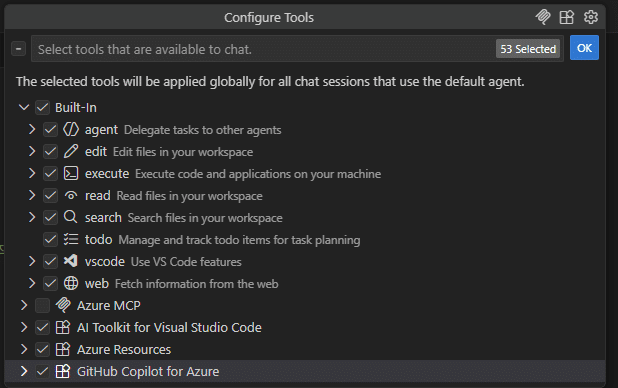
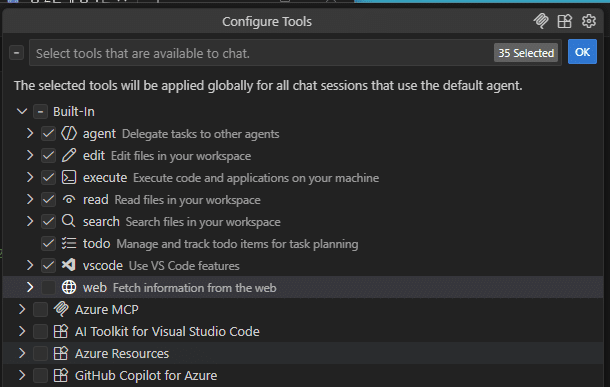
자주 사용하지 않는 Azure 관련 Tool을 중심으로 비활성화 했다. 현재 작업과 직접 관련 없는 클라우드·배포·테스트 Tool부터 비활성화하는 것이 가장 부담이 적다.
4.2 테스트 결과
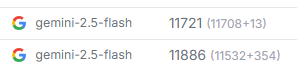
Total: 23,607로 줄어, 기존 29,323 대비 약 20% 토큰이 감소했다. AI 결과는 완전히 동일했다.
5. 외국어 배우기 팁
프로그래밍을 하면서 동시에 외국어도 같이 배울 수 없을까 하는 생각이 들었다.영어를 더 자주 쓰게 되다 보니, 문법까지 같이 봐 주면 좋겠다는 욕심이 생겼다.- 아래처럼 추가적인 Instruction에 추가 한다.
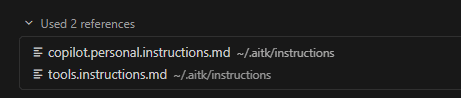
질문을 영어로 자동 번역하고 문법을 교정해 준다.교정된 영어 문장을 다시 이탈리아어로 보여 준다.코드 주석은 항상 짧고 명확한 영어로 유지하게 만들어 준다.- 만약 일본어로 바꾸고 싶다면 이탈리아어 부분을 모두 일본어로 바꾸면 된다.
---
description: Personal Copilot Instructions
applyTo: '**'
---

# Personal Copilot Instructions

- Respond to all user queries in **English**.
- When the user asks a question:
  1. If the question is **not** in English, **translate it into English** first.
  2. If the question **is** in English, **correct the grammar** (do not change the meaning).
  3. **Display the corrected question** in **English and Italian** before answering.
- All code comments must be written in **English**.
- Keep comments short and clear; do not include local language.

## ✅ Response Format
- **English (Corrected):** `<corrected English question>`
- **Italian (Corrected):** `<Italian translation of the corrected English question>`
- **Answer (in English):** `<your answer>`

## ✅ Example

**User Question:**
`come posso creare una funzione python per calcolare la media?`

**English (Corrected):**
`How can I create a Python function to calculate the average?`

**Italian (Corrected):**
`Come posso creare una funzione Python per calcolare la media?`

**Answer (in English):**
You can create a Python function like this:

```python
def calculate_average(numbers):
    # Return the average of a list of numbers
    return sum(numbers) / len(numbers)

# Example usage
data = [10, 20, 30]
print(calculate_average(data))  # Print the average
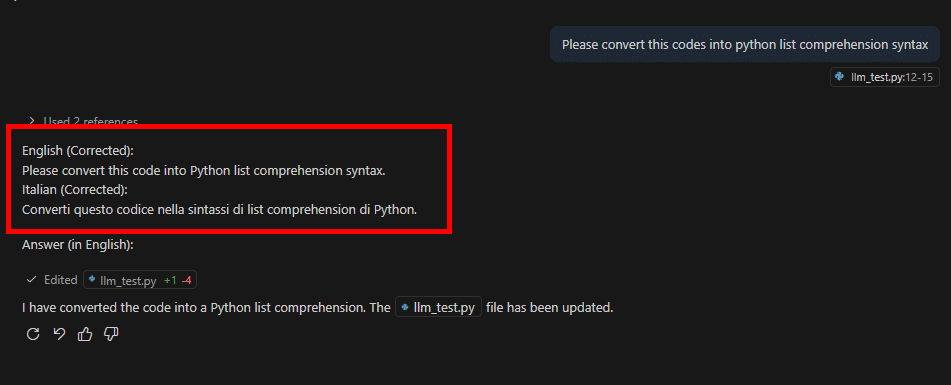
결과는 아래와 같습니다.
예시처럼 문법에 일부러 오류를 넣고 질문하면(codes -> code), 먼저 문장을 교정해 준다.
그다음 교정된 영어 문장을 이탈리아어로 번역해서 함께 보여 준다. 이 설정만으로도 프로그래밍하면서 자연스럽게 영어와 다른 외국어를 함께 연습할 수 있다. 또한 코드의 주석은 항상 영어로 만들어 준다.
6. 결론
이제는 Co-pilot 없이 프로그래밍하기가 부담스러울 정도다.단순한 코드 복사·붙여넣기 같은 작업도 Agent 모드에 맡기는 편이 훨씬 편하다.회사 업무에서는 토큰 비용을 크게 신경 쓰지 않지만, 개인 프로젝트에서는 결국 모두 '돈'이라 토큰 사용량이 신경 쓰인다.이번 테스트처럼 불필요한 Tool을 기본적으로 비활성화해 두면 토큰을 꽤 많이 절약할 수 있다.- 정리하면, 간단한 질의나 짧은 코드 수정에는 Ask 모드가 효율적이고, 여러 단계가 필요한 작업과 파일 편집에는 Agent 모드가 적합하다. Tools 구성을 정리하면 Agent 모드에서도 토큰을 20% 이상 줄일 수 있고, Copilot Instructions를 활용하면 같은 환경에서 외국어 학습까지 동시에 가져갈 수 있다.