사이트 하나가 털렸다. flywithu.com 이야기는 아니고, 개인적으로 아주 작게 쓰던 기록용 사이트다. 아이들 학원비 납부 여부를 월별로 체크하는 정도의 페이지였다. 주소는 어디에도 링크를 걸거나 공유한 적이 없는 서브도메인이었다. 외부 어디에도 기록되지 않은 도메인이라 노출될 일이 없다고 생각했다.
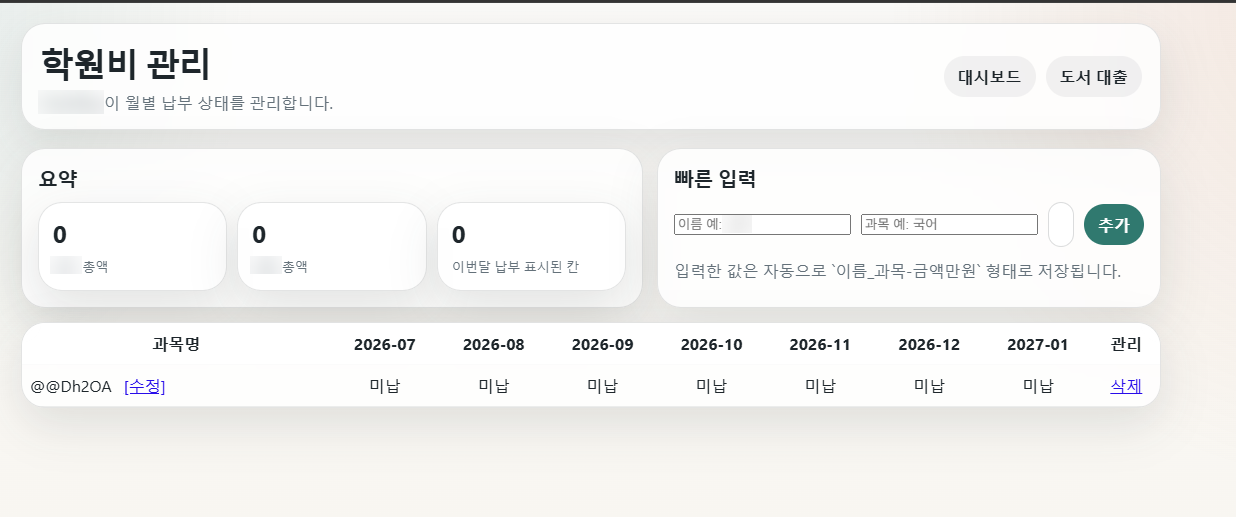
그런데 어느 날 들어가 보니 기존 데이터는 사라졌고, 과목명 자리에 @@Dh2OA라는 정체불명의 한 줄만 남아 있었다.
남아 있던 흔적. 개인 정보는 블러 처리.
피해와 조치
피해: 기존 기록 삭제, 의미 없는 항목 1건 추가
복구: 주기적으로 백업해 둔 데이터로 전체 복원
조치: 로그인 추가. “어차피 아무도 모르는 주소”라는 이유로 인증 없이 열어 두었던 것이 가장 큰 원인
결국 핵심은 나의 무관심이다. 그래도 궁금한 건 남는다. 어떻게 이 주소를 알았고, 왜 굳이 들어와서 이런 걸 남겼을까.
어떻게 찾아왔을까 — 추정
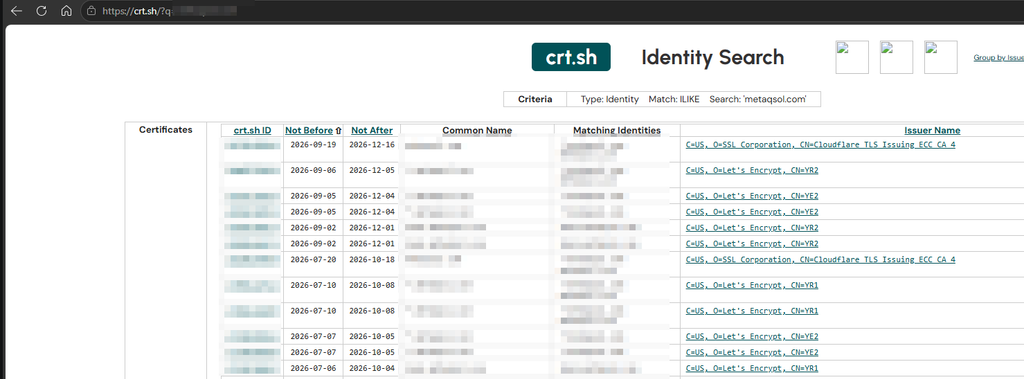
로그를 깊게 본 것은 아니라 확정할 수는 없다. 다만 가장 유력한 경로는 인증서 투명성(Certificate Transparency, CT) 로그다.
Let’s Encrypt 등으로 HTTPS 인증서를 발급받으면, 그 인증서에 들어간 도메인 이름이 공개 CT 로그에 기록됨
crt.sh 같은 사이트에서 누구나 조회 가능. 내가 어디에도 적지 않았어도 인증서 발급 기록에는 남아 있음 – 가능성에 대해서는 Claude 가 알려줌.
스캐너 봇들은 CT 로그를 실시간으로 구독하다가 새 호스트가 생기면 수 분~수 시간 안에 찾아옴
DNS 자체는 “등록된 레코드 목록 보기” 기능이 없음. 이름을 알아야 조회되는 구조
다만 우회 경로는 여럿: 공개 리졸버를 거친 조회를 모아 둔 passive DNS 데이터베이스, 흔한 이름을 대입해 보는 서브도메인 브루트포스, 설정이 잘못된 존 전송(AXFR), DNSSEC NSEC 레코드를 따라가는 존 워킹
즉 “주소를 숨겼다”는 생각 자체가 틀렸던 셈이다. 개별 인증서를 발급받는 순간, 그 서브도메인은 사실상 공개 목록에 올라간다. 숨기고 싶다면 와일드카드 인증서(*.example.com)를 쓰는 편이 낫지만, 그것도 보안이 아니라 약간의 은닉일 뿐이다.
왜 들어와서 이런 걸 남겼을까
아마 “왜”라고 물을 상대가 없을 가능성이 높다. 사람이 학원비 페이지를 노리고 들어왔다기보다는, 자동화된 스캐너가 지나가다 건드린 쪽에 가깝다고 본다.
입력 폼 발견 → 아무 값이나 넣고 제출 → 그 값이 저장되어 다시 화면에 나오는지 확인. 저장형 XSS·인젝션 취약점을 찾는 전형적인 절차
인증 없이 쓰기가 되는 페이지는 스캐너 입장에서 “쓸 만한 곳” 목록에 올라감. 이후 스팸 링크 게시나 다른 공격의 발판 후보
데이터가 통째로 사라진 것도 같은 맥락으로 추정. 화면의 삭제가 단순 링크(GET 요청)였다면, 페이지의 링크를 전부 따라가는 크롤러가 지나가기만 해도 행이 하나씩 지워짐. 악의라기보다 설계 실수가 만든 결과일 가능성
마지막 항목이 개인적으로 제일 뜨끔했다. 삭제나 수정 같은 상태 변경을 GET 링크로 만들면, 사람이 아니라 봇이 누르게 된다.
redroid로 안드로이드를 컨테이너에 띄워 쓰다 보면 금방 벽에 부딪힙니다. 화면과 입력은 원격으로 해결되지만, 카메라와 GPS, 그리고 BLE는 없습니다. 서버에는 그런 하드웨어가 처음부터 없기 때문입니다. 카메라로 코드를 비추고, 그 결과로 근처 BLE 장치의 잠금을 여는 식의 앱이라면 첫 단계부터 막힙니다. 읽을 카메라도, 말을 걸 BLE 라디오도 없으니까요.
그래서 방향을 바꿨습니다. 하드웨어는 이미 손에 있는 폰에 다 있습니다. 폰이 센서와 무선 신호를 WebSocket으로 보내고, 서버가 이를 가상 카메라, 가상 BLE 라디오, 가상 GNSS로 재현하면 됩니다. 컨테이너 안의 앱은 자기가 실제 폰에서 돌고 있다고 믿게 됩니다.
이 글은 그 구조를 정리하고, 특히 BLE를 붙이면서 겪은 “광고 패킷 홍수” 문제를 어떻게 4단계로 풀었는지 다룹니다.
2. 전체 아키텍처
flowchart TB
  subgraph C["📱 클라이언트 · RemoteController 앱"]
    direction TB
    CAM[Camera<br/>ForwardService]
    GPS[Gps<br/>ForwardService]
    BLE[ScoutService<br/>BLE]
  end
  WS(("WebSocket<br/>LAN"))
  R["🖥️ RemoteRelay :8080<br/>(redroid 컨테이너)"]
  C <-->|"카메라 · GPS 업로드 / BLE 양방향"| WS
  WS <--> R
그림 1-1. 클라이언트: 폰의 서비스들이 WebSocket 하나로 서버의 RemoteRelay에 연결
flowchart TB
  R["RemoteRelay :8080"]
  R --> CF[CameraUploadForwarder]
  R --> GF[GpsForwarder]
  R <--> BB["BleBridgeClient<br/>(Bluetooth 모듈)"]
  CF --> RH["remotecamera_helper<br/>:28554"] --> VC[가상 카메라]
  GF --> FG["fakegps_helper<br/>:2947"] --> GH[GNSS HAL]
  BB <--> GS[GattService]
  VC --> APP[["컨테이너 안 앱"]]
  GH --> APP
  GS <--> APP
그림 1-2. 서버: RemoteRelay가 기능별 helper와 가상 센서를 거쳐 컨테이너 앱으로 전달
서버(redroid 컨테이너): RemoteRelay가 WebSocket(:8080)으로 모든 스트림을 받아 중계
서버 쪽 경로는 기능별로 나뉩니다.
카메라: CameraUploadForwarder → remotecamera_helper(:28554) → 가상 카메라
GPS: GpsForwarder → fakegps_helper(:2947) → GNSS HAL
BLE: RemoteRelay → Bluetooth 모듈의 BleBridgeClient → GattService
여기에 두 가지 운영 규칙을 더했습니다.
기능별 소유권: camera, gps, ble는 한 번에 한 컨트롤러만 사용. claim으로 가져오고 기존 소유자는 revoked 수신
수요 기반 전송: 컨테이너 앱이 카메라를 실제로 열 때만 서버가 demand 메시지 송신, 그때부터 클라이언트 전송 시작 (DemandMonitor가 감지)
stateDiagram-v2
  [*] --> 비어있음
  비어있음 --> A소유: 컨트롤러 A claim
  A소유 --> B소유: 컨트롤러 B claim / A에 revoked
  B소유 --> A소유: 컨트롤러 A claim / B에 revoked
  A소유 --> 비어있음: A 연결 끊김
  B소유 --> 비어있음: B 연결 끊김
  note right of A소유
    camera, gps, ble
    각 기능마다 독립적으로 적용
  end note
그림 6. claim → 사용 중 → revoked 기능 소유권 상태도
수요 기반 전송은 생각보다 효과가 컸습니다. 아무도 카메라를 쓰지 않는데 JPEG를 계속 밀어 넣던 낭비가 사라졌습니다.
3. 기능별 구현
카메라와 GPS: 내 폰의 센서를 원격 폰에 빌려주기
카메라부터 보겠습니다. 한 문장으로 줄이면 “내 폰의 카메라를 원격 폰에 빌려주는 기능”입니다. 원격 폰(redroid 컨테이너)에는 카메라가 없습니다. 그래서 내 폰이 찍은 영상을 네트워크로 보내고, 원격 폰은 그 영상을 자기 카메라에서 나온 것처럼 앱에 넘겨줍니다.
원격 폰의 앱은 영상이 어디서 왔는지 모릅니다. 평소처럼 카메라를 열었을 뿐인데, 그 카메라에 내 폰이 보고 있는 장면이 들어 있는 것입니다. 앱 입장에서는 그냥 “내 카메라에 무언가가 비쳤다”일 뿐입니다.
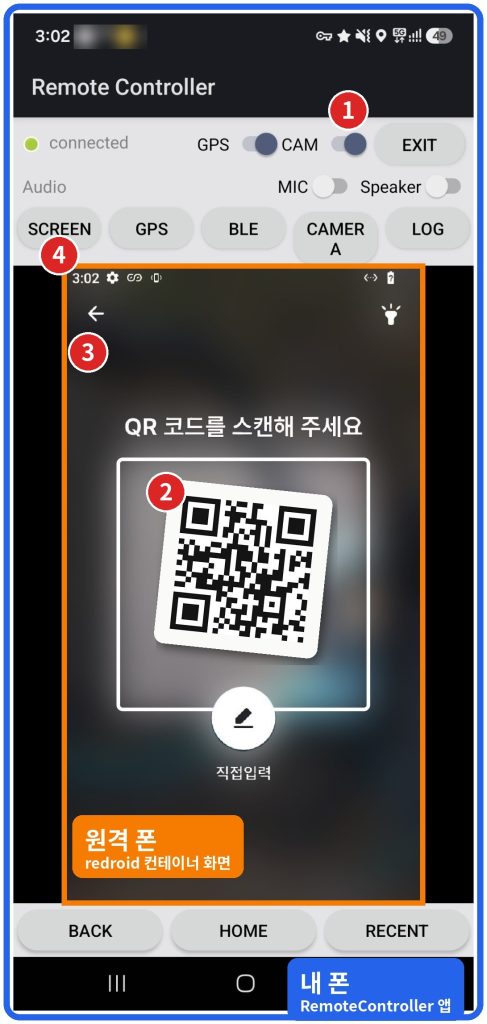
아래 스크린샷이 그 모습입니다. 화면이 두 겹이라 처음에는 헷갈립니다. 바깥쪽 파란 테두리는 지금 손에 들고 있는 내 폰의 RemoteController 앱입니다. 안쪽 주황 테두리는 그 앱이 띄워 주는 원격 폰의 화면입니다. 원격 폰에서 QR 스캔 앱을 실행해 두고, 그 화면을 내 폰으로 다시 보고 있는 상태입니다. 그림 속 번호를 따라가면 영상이 한 바퀴 도는 길이 보입니다.
① 내 폰 카메라 촬영: 원격 폰의 앱이 카메라를 여는 순간 서버가 demand 메시지 송신, 내 폰의 CameraForwardService가 실제 카메라로 촬영 시작. 앱 상단 CAM 스위치가 이 기능의 켜짐 상태
② 원격 폰으로 전송: 찍은 프레임을 JPEG로 압축해 WebSocket으로 송신 → 원격 폰의 RemoteRelay → CameraUploadForwarder → remotecamera_helper(:28554) → 가상 카메라. QR 스캔 테두리 안에 보이는 QR 코드가 바로 내 폰 카메라가 보고 있는 장면
③ 원격 폰 앱의 인식: 원격 폰의 QR 스캔 앱이 안드로이드 표준 카메라 API로 가상 카메라를 열고, 들어오는 프레임을 자기 카메라 입력으로 처리. 앱 코드 수정 없음
④ 다시 내 폰으로: 원격 폰의 화면 전체를 다시 JPEG로 내 폰에 송신, RemoteController의 SCREEN 탭에 표시. 터치와 BACK·HOME 버튼은 반대 방향으로 원격 폰에 주입
① 내 폰 카메라 촬영 → ② 원격 폰의 가상 카메라로 전송 → ③ 원격 폰 앱이 자기 카메라로 인식 → ④ 원격 폰 화면이 다시 내 폰에 표시. 파란 테두리는 내 폰, 주황 테두리는 원격 폰 화면
정리하면 내 폰의 카메라 영상은 내 폰 → 원격 폰 → 다시 내 폰으로 한 바퀴를 돕니다. 스크린샷 속 QR 코드는 내 폰 카메라가 찍은 장면이 원격 폰의 앱을 거쳐 다시 내 폰 화면에 나타난 것입니다. 같은 흐름을 구성 요소 단위로 그리면 아래와 같습니다.
flowchart TB
  subgraph MY["📱 내 폰 · RemoteController 앱"]
    CAMR["실제 카메라<br/>CameraForwardService"]
    VIEW["SCREEN 탭<br/>원격 폰 화면 표시"]
  end
  subgraph RM["🖥️ 원격 폰 · redroid 컨테이너"]
    RELAY["RemoteRelay :8080"]
    HELP["remotecamera_helper :28554"]
    VCAM["가상 카메라"]
    APP["QR 스캔 앱<br/>(코드 수정 없음)"]
  end
  APP -. "⓪ 카메라 열림 → demand" .-> CAMR
  CAMR -->|"① 촬영 · ② JPEG 전송"| RELAY
  RELAY --> HELP --> VCAM
  VCAM -->|"③ 일반 카메라 API"| APP
  APP -->|"④ 화면을 JPEG로 되돌림"| VIEW
  style CAMR fill:#dbe7ff,stroke:#2563eb
  style VIEW fill:#dbe7ff,stroke:#2563eb
  style VCAM fill:#ffe6cc,stroke:#f57c00
  style APP fill:#ffe6cc,stroke:#f57c00
그림 1-3. 카메라 영상이 한 바퀴 도는 경로 (번호는 위 스크린샷과 같음)
이 경로에는 실제로 쓰면서 넣은 세부 동작이 몇 가지 있습니다.
수요 기반 시작: 원격 폰의 앱이 카메라를 쓰지 않을 때는 촬영도 전송도 없음. 앱이 카메라를 닫으면 약 3초 뒤 전송 중단
끊김 처리: 전송이 잠깐 끊겨도 가상 카메라가 마지막 프레임을 유지해 앱 화면이 깨지지 않음. 부팅 후 영상이 한 번도 없었을 때만 대체 그림 표시
최신 프레임 우선: 원격 폰 화면을 내 폰으로 보낼 때는 최신 JPEG 한 장만 유지하고 밀린 프레임은 버림
GPS는 같은 방식이지만 더 단순합니다. 내 폰의 위치를 fakegps_helper(:2947)로 보내면, 원격 폰의 GNSS HAL이 이를 실제 위성 신호처럼 앱에 전달합니다. 위치는 한쪽으로 흘려보내기만 하면 되니 되돌아오는 경로가 없습니다.
BLE
BLE는 양방향이라 이야기가 다릅니다.
스캔: 클라이언트가 실제 스캔 수행 → ble_scan_result(address, rssi, advData) 송신 → 서버 앱의 스캔 콜백으로 전달
GATT: 서버 앱의 connect/read/write/notify 요청 → 클라이언트로 전달 → 실제 장치와 통신 → ble_gatt_event로 결과 회신
MTU 247 요청: 한 번에 실어 보내는 양을 늘려 LAN 왕복 횟수 감소
핵심은 서버의 Bluetooth 모듈 안에 넣은 BleBridgeClient입니다. GattService 입장에서는 이것이 로컬 BLE 라디오처럼 보입니다. 그래서 앱 코드는 한 줄도 바꾸지 않아도 됩니다.
sequenceDiagram
  participant A as 컨테이너 앱
  participant G as GattService
  participant B as BleBridgeClient
  participant R as RemoteRelay
  participant S as ScoutService (폰)
  participant D as 실제 BLE 장치
  A->>G: connectGatt / readCharacteristic
  G->>B: GATT 요청
  B->>R: GATT 명령 (ble_connect 등)
  R->>S: WebSocket (text 레인, 우선)
  S->>D: 실제 GATT 연결 · 읽기
  D-->>S: 응답
  S-->>R: ble_gatt_event
  R-->>B: ble_gatt_event
  B-->>G: 즉시 처리 (큐 우회)
  G-->>A: onCharacteristicRead
그림 2. 앱 connect/read → GattService → BleBridgeClient → relay → ScoutService → 실제 장치 → ble_gatt_event 회신 시퀀스
4. 트러블슈팅: BLE가 매우 느려지다
증상
주변에 BLE 기기가 많은 곳에서 BLE가 눈에 띄게 느려졌습니다. 스캔 목록이 버벅이고, characteristic read 하나에 한참이 걸렸습니다. 따라가 보니 read 응답이 앞서 쌓인 광고 수백 개 뒤에서 차례를 기다리고 있었습니다.
나중에 집에서 다시 재 보니, 60초 동안 보이는 주소가 36~43개(랜덤 주소 포함)인 평범한 환경에서도 폰이 받는 광고만 초당 약 40건이었습니다. 필터가 없으면 이 40건이 하나하나 JSON 메시지가 되어 LAN을 건넙니다.
원인
원인은 세 가지가 겹친 것이었습니다.
LOW_LATENCY 스캔은 기기당 초당 10~100개의 광고 보고
클라이언트가 이를 전부 JSON으로 변환해 그대로 송신
스캔 결과와 GATT 이벤트가 같은 FIFO 사용, 서버는 소켓 읽기 스레드에서 무거운 스캔 콜백을 직접 처리
즉 꼭 도착해야 하는 GATT 응답이, 몇 초 뒤면 의미가 없어지는 광고 데이터에 막혀 있었습니다.
flowchart TB
  subgraph BEFORE["개선 전 · 단일 FIFO"]
    direction LR
    b1[광고] --> b2[광고] --> b3[광고] --> b4["… 수백 개 …"] --> b5[광고] --> b6["⏳ GATT read 응답"]
  end
  subgraph AFTER["개선 후 · 우선순위 분리"]
    direction LR
    a1["⚡ GATT read 응답"] --> a2["광고 (주소별 최신 1개)"] --> a3["광고 (주소별 최신 1개)"]
  end
  BEFORE ~~~ AFTER
  style b6 fill:#fde2e2,stroke:#d33
  style a1 fill:#dff5e3,stroke:#2a7
그림 3. 개선 전(광고 뒤에 GATT read가 대기) vs 개선 후(GATT가 앞질러 감) 타임라인 비교
개선 1: 클라이언트 ScanThrottle
보내기 전에 거르는 것이 가장 쌉니다. 판정 규칙은 이렇습니다.
첫 발견은 항상 전송
같은 기기는 300ms 이내 재전송 억제
광고 데이터가 바뀌었거나 RSSI가 6dB 이상 변했을 때만 전송
변화가 없어도 2초마다 keep-alive (기기가 사라진 것처럼 보이지 않도록)
// ScanThrottle.shouldSend 핵심 부분 (발췌)
State s = mStates.get(address);
if (s == null) { s = new State(); mStates.put(address, s); }   // 첫 발견: 전송
else {
    long since = nowMs - s.lastSentMs;
    if (since < mMinIntervalMs) return false;                    // 300ms 억제
    boolean changed = hash != s.advHash || len != s.advLen
            || Math.abs(rssi - s.lastRssi) >= mRssiDelta;        // 광고 변경, RSSI 6dB
    if (!changed && since < mRefreshMs) return false;            // 2초 keep-alive
}
광고 데이터는 바이트 배열을 통째로 비교하지 않고 해시와 길이만 기억해 둡니다. 걸러진 광고는 JSON을 만드는 단계까지 가지도 않습니다.
서버에서 클라이언트로 내려가는 방향도 같은 문제가 있었습니다. 큐를 데이터 성격별 레인으로 나눴습니다.
text: 제어 메시지와 GATT 명령, 최우선
scans: 주소별 최신 값
frame: 최신 JPEG 한 장
text를 먼저 비우고, scans와 frame은 번갈아 보내서 한쪽이 다른 쪽을 굶기지 않게 했습니다.
flowchart LR
  T["text 레인<br/>제어 · GATT<br/>순서 보장"]
  SC["scans 레인<br/>주소별 최신 값"]
  FR["frame 레인<br/>최신 JPEG 1장"]
  P{{"1순위: text 먼저 비움"}}
  RR{{"2순위: 라운드로빈"}}
  SND[["sender → WebSocket"]]
  T --> P --> SND
  SC --> RR
  FR --> RR
  RR --> SND
  style T fill:#dff5e3,stroke:#2a7
그림 5. text 우선, scans와 frame은 번갈아 sender로 가는 레인 구조
개선 4: 서버 수신 측 ScanCoalescer
마지막은 서버의 받는 쪽입니다. 소켓을 읽는 스레드가 onScanResult를 직접 부르던 구조를 끊었습니다.
소켓 읽기 스레드: 스캔 결과를 큐에 넣기만 함
별도 처리 스레드: 무거운 onScanResult 호출
GATT 이벤트: 큐를 거치지 않고 즉시 처리
공통 원칙
네 단계를 정리하고 보니 결국 원칙은 하나였습니다. 데이터를 두 종류로 나누는 것입니다.
종류
예
처리 방식
흘러야 하는 데이터
영상, 스캔
최신 값만 유지, 밀리면 버림
반드시 도달해야 하는 데이터
GATT, 제어
순서 보장, 항상 우선
결과
항목
A: 필터 끔
B: ScanThrottle
서버가 받은 ble_scan_result (초당 평균 / 최대)
39.9 / 51
11.9 / 17
페이로드 바이트 (초당 평균 / 최대)
6,599 / 8,436
1,970 / 2,818
characteristic read 지연 (중앙값 / p95, 30회)
744 / 805 ms
741 / 799 ms
ScanThrottle만 끄고 켜서 60초씩 비교했습니다. 서버 쪽 레인 분리와 ScanCoalescer, 폰의 GATT 우선 큐는 두 경우 모두 그대로입니다. 폰은 두 경우 모두 초당 약 40건의 광고를 받았고, 필터를 켜면 그중 30% 정도만 보냈습니다. 메시지 수와 바이트가 약 3.3분의 1로 줄었습니다.
%%{init: {"themeVariables": {"xyChart": {"plotColorPalette": "#3b6fd4"}}}}%%
xychart-beta
  title "서버가 받은 ble_scan_result (초당, 60초 평균)"
  x-axis ["A: 필터 끔", "B: ScanThrottle"]
  y-axis "메시지/초" 0 --> 45
  bar [39.9, 11.9]
그림 7. 필터를 켜면 같은 광고 흐름에서 전달하는 메시지가 약 3.3분의 1로 줄어듦
반면 read 지연은 거의 같았습니다. 이 환경에서는 필터를 꺼도 폰과 서버의 대기열이 최대 1건 정도라 줄 자체가 생기지 않았습니다. 처음 문제가 됐던 붐비는 환경이 집에서는 재현되지 않은 것입니다. 그래서 이번 측정으로 확인한 것은 트래픽 감소까지입니다. 지연 개선은 예전 단일 FIFO 구조와 붐비는 곳에서 직접 비교해야 드러날 것 같습니다.
측정 조건: Galaxy S9+(LineageOS), 5GHz Wi-Fi, x86_64 redroid 컨테이너, 시나리오별 1회 측정.
5. 검증
회귀 시험: 자동 시험 66 통과 / 1 실패. 실패한 1건은 앞선 시험이 열어 둔 앱 화면이 남아 있어서 생긴 시험 시작 상태 문제로, 이번 BLE 변경과는 관련 없음 (시작 전에 정리하도록 고쳤고 전체 재실행은 아직)
호스트 단위 테스트: ScanCoalescerTest로 주소별 최신 값 유지와 대기열 상한 동작 검증
6. 한계와 다음 단계
네트워크 상태가 나쁘면 GATT 지연이 그대로 앱에 드러납니다. 기능 소유권도 한 번에 한 컨트롤러만 허용하므로, 여러 폰의 센서를 섞어 쓰는 것은 아직 안 됩니다. 측정에서 본 read 한 번에 740ms 안팎이 걸리는 것도 네트워크 왕복만으로는 설명이 안 되는 숫자라 따로 들여다볼 생각입니다.
다음으로는 붐비는 환경에서 예전 단일 FIFO 구조와 지금 구조를 직접 비교해 지연 차이를 확인하고, 남은 회귀 시험 실패 1건을 정리할 계획입니다. 웹 뷰어(클라이언트 목록, 강제 끊기, 회전)와 GApps/ARM 번역 환경 이야기는 따로 한 편으로 다루겠습니다.
하드웨어가 없는 컨테이너에 하드웨어를 “빌려주는” 일은 결국 네트워크 위에 장치를 흉내 내는 일이었습니다. 그리고 그 흉내가 자연스러우려면, 무엇을 버려도 되고 무엇은 절대 버리면 안 되는지를 먼저 정해야 했습니다.
덧붙이면, 이름은 “over LAN”이지만 같은 LAN 안에서만 되는 것은 아닙니다. 폰을 Wi-Fi 대신 5G 모바일 데이터로 붙여서도 써 봤는데, 실제로 쓰는 데는 문제가 없었습니다. LTE나 5G 정도의 연결이면 실사용에는 충분합니다.
HDA (Highway Driving Assist) — 고속도로 주행 보조. 차로 유지 + 앞차 추종
테슬라는 그냥 사각지대 경고, 그리고 오토파일럿
그리고 이 글 전체를 관통하는 단어 하나. 화면만 놓고 말할 때는 UI/UX라고 하지만, 소리·빛·진동·버튼 촉감까지 차와 사람 사이의 모든 접점을 통칭할 때는 HMI(Human-Machine Interface)라고 부른다. 규제나 논문에서는 DVI(Driver-Vehicle Interface)라는 말도 쓴다.
이 글은 결국 두 회사의 HMI 비교다.
1. 사각지대 경고: 진동 vs 앰비언트 라이트
팰리세이드의 방식 — HUD 표시 + 미러 LED + 경고음 + 스티어링 휠 진동
팰리세이드의 BCW는 옆 차로에 차가 있으면 사이드미러 경고등이 켜지고, 방향지시등을 켜면 여기에 경고음과 스티어링 휠 진동이 더해진다. HUD에도 표시된다.
처음 이 진동을 겪었을 때는 “이게 정답이다” 싶었다. 소리는 음악이나 대화에 묻히는데, 진동은 손바닥으로 직접 전달되니까 놓칠 수가 없다.
테슬라의 방식 — 앰비언트 라이트가 빨갛게 물든다
테슬라는 사각지대 경고에 스티어링 휠 진동을 쓰지 않는다. 대신 대시보드를 가로지르는 앰비언트 라이트 바 전체가 빨갛게 켜진다. 한쪽만이 아니라 전부다.
처음엔 좌우로 나눠 켜면 방향까지 알려줄 수 있는데 왜 전부 켤까 싶었다. 그런데 며칠 타보고 생각이 바뀌었다. 방향은 이미 내가 알고 있다. 이 경고는 내가 깜빡이를 켰을 때 나오는 거니까. 오른쪽으로 가려고 깜빡이를 켠 사람에게 “오른쪽입니다”라고 알려주는 건 정보가 아니다.
그 순간 필요한 건 방향이 아니라 “지금 하지 마”라는 강도다. 그래서 전부 켜는 게 맞다. 시야 전체가 붉어지면 무시할 수가 없다.
빗길 주행 중 사각지대 경고. 대시보드를 가로지르는 라이트바 전체가 빨갛게 켜진다. 화면을 보러 고개를 돌릴 필요가 없다.
사진을 보면 말로 설명할 필요가 없다. 전방 도로와 경고가 같은 프레임 안에 있다. 시선을 옮기지 않아도 눈 가장자리로 들어온다. 게다가 이 사진은 비 오는 날 낮에 찍은 것인데도 충분히 눈에 띈다. 야간 전용 장점이 아니라는 뜻이다.
그런데 실제로 타보니 시각 효과가 압도적으로 좋았다. 예상 밖이었다. 이유를 곱씹어보니 몇 가지가 있다.
주변시(peripheral vision)를 그대로 활용함 — 시선을 옮기지 않아도 인지됨. 정면을 보고 있어도 눈 가장자리로 들어옴
전달 조건이 없음 — 진동은 손이 핸들에 있어야, 미러 LED는 미러를 봐야 전달됨. 빛은 앞만 보고 있으면 됨
강도가 압도적임 — 시야 전체가 붉어진다. 진동은 “뭔가 왔다” 수준이지만 이건 무시가 안 됨
동승자도 같이 인지함 — 진동은 오직 운전자만 아는 정보. 빛은 차 안 전체가 공유
핵심은 경고가 운전자에게 도달하느냐다. 두 차 모두 경고 시점은 같다. 깜빡이를 켜는 순간이다. 다른 건 그 경고를 어느 채널로 보내느냐뿐이다.
팰리세이드는 HUD와 미러와 손바닥으로 보낸다. HUD는 표시가 작고, 미러 LED는 미러를 봐야 보이고, 스티어링 휠 진동은 손이 핸들에 제대로 놓여 있어야 전달된다. 경고음은 아이들 떠드는 소리에 묻힌다.
테슬라는 시야로 보낸다. 전방을 보고 있으면 무조건 들어온다. 조건이 없다. 미러를 볼 필요도, 손이 어디 있을 필요도 없다. 앞만 보고 있으면 된다. 그리고 운전 중에 앞을 안 보는 사람은 없다.
진동이 좋다고 생각했던 이유는 “소리에 묻히지 않는다”였는데, 빛은 소리에도 안 묻히고 손 위치에도 안 묻힌다. 조건이 하나 더 적다.
왜 지금까지 앰비언트 라이트를 이렇게 안 썼을까
이게 이 글을 쓰게 된 진짜 이유다.
앰비언트 라이트는 그동안 철저하게 무드등이었다. 색상 개수를 마케팅 포인트로 내세웠지만, 결국 하는 일은 “예쁘게 보이기”였다. 옵션표에서는 감성 항목이었지 안전 항목이 아니었다.
그런데 생각해보면 대시보드를 가로지르는 길고 얇은 광원은 운전자의 주변시 범위 전체를 덮는 유일한 면이다. 화면보다 넓고, 미러보다 가깝고, 계기판보다 시야 중앙에 있다. 하드웨어는 이미 차에 달려 있었고, 필요한 건 그걸 정보 채널로 쓰겠다는 발상뿐이었다.
테슬라가 대단한 신기술을 넣은 게 아니다. 기존 부품의 용도를 재정의했을 뿐이다. 그런데 그 한 끗이 체감 차이를 만든다.
확장 가능성도 크다. 색과 점멸 속도만 나눠도 여러 종류를 구분할 수 있다. 문 열기 전 후방 접근 경고, 차로 이탈, 충전 상태, 오토파일럿 활성화 여부 — 얹을 수 있는 게 많다. 좌우로 나눠 켜는 것도 언젠가 쓸 카드로 남아 있다.
2. 그런데 HUD가 없다 — 테슬라의 가장 큰 아쉬움
테슬라는 계기판이 없다. 모든 정보가 중앙 스크린 한 곳에 모여 있고, 그 스크린은 운전자 기준 오른쪽에 있다. 그리고 대부분의 알림은 화면 구석에 작은 토스트 메시지로 잠깐 떴다가 사라진다.
그래서 이런 일이 반복된다.
‘띵’ ‘띵’ 소리가 났다. 근데 뭐였는지 모르겠다.
고개를 오른쪽으로 돌려 화면을 봤을 때는 이미 토스트가 사라진 뒤다. 무슨 경고였는지 확인할 방법이 없다. 소리만으로는 종류를 구분할 수 없고, 놓치면 그냥 놓치는 거다.
사각지대 경고는 앰비언트 라이트라는 훌륭한 채널을 확보했지만, 나머지 알림들은 여전히 “소리 + 놓치기 쉬운 작은 토스트”에 머물러 있다. 좋은 해법을 하나 찾아놓고 나머지에는 적용하지 않은 느낌이다.
팰리세이드 HUD는 이 지점에서 확실히 앞선다
팰리세이드의 HUD는 정보를 시선 이동 없이 전방에 띄운다. 속도, 내비게이션 방향, 차로 유지 상태, 앞차 인식 여부, 그리고 후측방 경고까지 전부 앞유리에 표시된다.
도로에서 눈을 떼지 않아도 상황을 파악할 수 있다는 것. 이건 편의 기능이 아니라 안전 기능이다. 모델Y를 타면서 팰리세이드에서 가장 그리운 게 이거다.
3. 폰이 키가 되는 것 — 편한데 불안하다
테슬라는 휴대폰이 키다. 주머니에 폰만 있으면 문이 열리고, 내리면 알아서 잠긴다. 편하다. 편한 건 맞는데, 며칠 타보니 자꾸 뒤를 돌아보게 된다.
폰을 놓고 내리면 차가 안 잠긴다
당연한 동작이다. 키가 차 안에 있으니까 잠글 수가 없다. 논리적으로는 완벽하다. 문제는 그 사실을 내가 모른다는 것이다.
물리 키가 있던 시절에는 최소한 차를 잠그는 행위가 있었다. 버튼을 누르거나, 시동을 끄고 내리는 절차를 밟으면서 한 번 더 확인하게 된다. 테슬라는 그 동작이 통째로 사라졌다. 아무것도 안 해도 되니까, 아무것도 안 됐을 때도 똑같이 아무 일이 없다. 잠긴 것과 안 잠긴 것이 구분되지 않는다.
‘삐빅’ 하나가 이렇게 중요했나
팰리세이드는 잠기면 즉시 ‘삐빅’ 소리가 난다. 차 문이 안 잠겼으면 어쨌든 알림이 와서 알 수 있었다.
테슬라도 잠금 알림은 있는데, 인식 거리가 꽤 멀어서 이미 한참 걸어간 뒤에 잠기는 경우가 있다. 그때는 소리가 들리든 안 들리든 확인이 안 된다. BLE의 한계다. 그래서 고급차는 UWB를 쓴다.
결국 잠금에도 명확한 액션과 피드백이 필요하다는 결론이다. 자동화가 좋은 건 맞지만, 자동화의 결과를 사람이 확인할 수 있어야 한다. 앞에서 앰비언트 라이트를 칭찬한 이유와 정확히 같은 이야기다. 정보가 존재하는 것과 그 정보가 사람에게 도달하는 것은 다른 문제다.
4. 이건 좀 해줬으면 — 신호 변경 알림
테슬라 화면에는 신호등이 그려진다. 색까지 인식해서 표시한다. 즉 차는 이미 신호가 언제 바뀌는지 알고 있다.
그런데 그 정보로 아무것도 안 해준다. 신호 대기 중에 앞차가 출발했는지, 신호가 초록으로 바뀌었는지 알려주지 않는다.
아이나비 블랙박스는 이걸 해준다. 신호가 바뀌면 음성으로 알려준다. 수백만 원짜리 자율주행 하드웨어를 얹은 차가, 십몇만 원짜리 블랙박스가 하는 일을 안 하고 있는 셈이다.
완전한 자율주행을 안 해줘도 된다. 인식한 정보를 운전자에게 전달만 해줘도 체감 가치가 크다. 신호 변경, 앞차 출발 — 이 둘만 있어도 신호 대기 중 폰을 보다가 뒤차에게 경적 듣는 일이 사라진다.
그리고 이건 앞에서 계속 반복된 이야기와 같은 구조다. 센서는 이미 다 보고 있다. 문제는 그걸 사람에게 전달하지 않는다는 것이다.
5. 차로 유지: HDA의 갈지자 vs 테슬라의 직진
HDA를 켜고 달리면 차가 차로 안에서 좌우로 계속 왔다 갔다 한다. 차선을 밟지는 않지만 미세하게 갈지자로 간다. 조향이 끊임없이 보정되는 게 느껴진다.
테슬라는 그냥 쭉 간다. 차로 중앙을 잡고 흔들림 없이 유지한다. 이 차이는 장거리에서 피로도로 직결된다. 갈지자 주행은 몸이 미세하게 계속 흔들리는 데다, “지금 잘 가고 있나?”를 무의식적으로 계속 확인하게 만든다.
그런데 이 비교, 공평한가
짚고 갈 게 있다. 내 팰리세이드의 UI는 세대가 꽤 됐고, 모델Y는 최신이다. 구형과 최신을 붙여놓고 비교하는 게 공평하냐는 반론이 나올 수 있다.
인정한다. 팰리세이드의 화면은 요즘 기준으로 낡았다. 그런데 팰리세이드 이전에 타던 차가 BMW ID7이었다. ID7에서 되던 기능들이 현대 UI에는 없었다. 하다못해 전화가 걸려와도 현대차는 HUD에 그 정보를 띄워주지 않았다. 이건 세대의 차이가 아니라 방향성의 차이다.
덧붙이면 이 감상은 나만의 것이 아닌 것 같다. 뒤에서 볼 Euro NCAP 평가에서도 BMW는 운전자 참여 항목에서 높은 점수를 받았다. 화면도 잘 만들고 알림도 잘 주는 회사가 있다는 이야기다. 둘 중 하나만 고르라는 법은 없다.
그래서 이건 신구의 문제가 아니라고 본다. 테슬라의 앰비언트 라이트는 부품이 새로워서 좋은 게 아니라 그 부품을 어디에 쓸지 정한 판단이 좋아서 좋은 거다. 반대로 계기판을 없앤 것도 기술이 부족해서가 아니라 그렇게 하기로 결정한 거다. 최신 UI를 얹고도 알림이 아쉬울 수 있고, 낡은 UI로도 빠짐없이 알려줄 수 있다.
기술의 발전보다 철학의 문제다. 그래서 세대가 달라도 비교할 만하다고 생각한다.
부록. Euro NCAP은 이걸 어떻게 채점했나
여기까지는 개인 경험이다. 그럼 업계는 이런 걸 어떻게 평가할까 궁금해져서 찾아봤다. 생각보다 체계가 잡혀 있었고, 무엇보다 내가 느낀 것과 평가 항목이 상당히 겹쳐서 놀랐다.
화면 UI/UX와 평가 기준이 다르다
앱이나 웹에서는 메뉴 depth, 클릭 수 같은 게 핵심 지표다. 목표까지 얼마나 빨리 도달하느냐, 즉 효율의 문제다.
차는 전제가 다르다. 화면 조작은 주 과업이 아니다. 운전이 주 과업이고 조작은 부 과업이다. 그래서 목표가 효율이 아니라 간섭 최소화가 된다. 주요 지표는 이런 것들이다.
시선 이탈 시간(eyes-off-road) — depth를 대체하는 가장 중요한 척도. 미국 NHTSA 가이드라인은 1회 응시 2초, 누적 12초를 기준으로 함
블라인드 조작 가능성 — 안 보고 손으로 찾아지는가. 물리 버튼이 유리한 이유
모드 인지(mode awareness) — “지금 이게 켜져 있나?”를 아는가. ADAS에서 가장 치명적인 실패 지점
상황 인식(situation awareness) — 감지 → 이해 → 예측. 앰비언트 라이트가 강한 지점
오경보율 — 틀린 경고가 잦으면 진짜 경고도 무시하게 됨(cry wolf effect)
신뢰 보정(trust calibration) — 실제 성능만큼만 믿는가. 과신도 불신도 위험
2026년부터 HMI가 점수가 됐다
유럽 Euro NCAP은 2026년 1월부터 HMI 평가를 신설했다. 필수 조작계의 위치·명확성·사용 편의성을 채점하고, 자주 쓰는 기능에 물리 버튼이 있는지를 본다. 방향지시등, 비상등, 경적, 와이퍼, eCall SOS — 이 다섯 가지를 터치스크린에만 넣으면 최고 등급을 못 받는다.
차종별 점수표 — Assisted Driving Grading
Euro NCAP은 2020년부터 주행 보조 시스템을 따로 등급화하고 있다. 두 축으로 나뉜다.
Assistance Competence — 차량 보조 능력과 Driver Engagement(운전자를 얼마나 참여시키는가)의 균형
Safety Backup — 시스템이 실패했을 때의 충돌 회피 성능
등급은 Entry / Moderate / Good / Very Good 네 단계다. 2025년 결과가 흥미롭다.
차종
Assistance Competence
Safety Backup
등급
기아 EV3 (HDA2)
74%
88%
Very Good
테슬라 모델 S (오토파일럿)
30%
94%
Moderate
테슬라 숫자가 극단적이다. Safety Backup 94%, Assistance Competence 30%. 위급 상황에서 사고를 막는 능력은 최상위인데, 평소에 운전자와 협업하는 능력은 최하위라는 뜻이다.
Euro NCAP의 총평은 이랬다. 안전 백업과 차량 보조 수준은 뛰어나지만 그만큼의 Driver Engagement를 갖추지 못해 과의존 가능성이 있다는 것. 이 글에서 계속 반복한 “센서는 다 보고 있는데 사람에게 전달하지 않는다”를 기관이 점수로 표현한 셈이다.
가장 놀라운 숫자 — 테슬라는 운전을 훨씬 잘한다
세부 항목까지 열어보면 이야기가 완전히 달라진다. 어댑티브 크루즈 컨트롤 성능 점수를 나란히 놓아봤다.
기아 EV3의 크루즈 성능 — 40점 만점에 25.3점. (출처: Euro NCAP)테슬라 모델 S의 크루즈 성능 — 전 항목 녹색, 40점 만점. (출처: Euro NCAP)
기아 EV3는 25.3점, 테슬라 모델 S는 40점 만점이다.
EV3는 정지 차량 접근, 감속하는 차량 접근에서 노란불이 켜졌고, 앞차가 비켜서면서 정지 차량이 드러나는 상황과 90km/h 이상에서의 우측 추월 방지에서는 빨간불을 받았다. 테슬라는 전 항목 녹색이다. 하나도 안 틀렸다.
그런데 종합 등급은 이렇다.
기아 EV3 — Very Good. (출처: Euro NCAP)테슬라 모델 S — Moderate. (출처: Euro NCAP)
운전은 테슬라가 압도적으로 잘하는데, 종합 등급은 기아가 Very Good, 테슬라가 Moderate다. 뒤집힌 이유는 하나다. 운전자에게 알려주는 능력에서 깎였기 때문이다.
Euro NCAP이 밝힌 감점 사유를 요약하면 이렇다. ‘Autopilot’이라는 이름이 완전 자율주행을 암시해 부적절하다는 것, 홍보물이 설명서에 적힌 한계와 어긋나 혼동을 줄 수 있다는 것, 그리고 상태 정보 자체는 명확하지만 그것을 운전자의 직접 시야에 보여주는 HUD가 없다는 것.
반대로 EV3에 대해서는 ‘Highway Driving Assist 2’라는 이름이 기능을 정확하게 표현하고 있고, 홍보물과 설명서가 시스템의 한계를 제대로 알리며, 시스템 상태가 HUD를 통해 운전자의 직접 시야에 명확히 표시된다고 평가했다.
내가 이 글 앞부분에서 쓴 말과 거의 같은 이야기다. 차이가 있다면 나는 감으로 썼고 저쪽은 점수로 매겼다는 것뿐이다.
“내가 운전할 테니까 너는 알림만 봐”
이 점수표를 한참 들여다보다가 테슬라의 스탠스가 뭔지 알 것 같았다.
“운전은 내가 할게. 너한테는 알림만 줄게.”
크루즈 성능 만점, Safety Backup 94%. 실제로 잘한다. 그러니 굳이 운전자에게 상세히 보고할 이유가 없다고 판단한 것 아닐까. 계기판을 없앤 것도, 알림을 작은 토스트로 처리한 것도, 그 전제 위에서는 일관된 선택이다.
문제는 내가 아직 그걸 못 믿는다는 것이다. ‘띵’ 소리가 났는데 뭐였는지 모르면 불안하다. 차는 다 알고 있는데 나만 모르는 상태가 계속된다.
이게 내 문제인지 테슬라의 문제인지는 아직 모르겠다. 시간이 지나면 신뢰가 쌓여서 자연스러워질 수도 있다. 다만 Euro NCAP이 지적한 게 정확히 이 지점이라는 건 짚어둘 만하다. 과의존 가능성. 믿게 만들었으면 믿을 만한 근거도 같이 보여줘야 한다는 것.
잘하니까 굳이 안 알려줘도 된다는 판단은, 정작 사람이 개입해야 하는 순간에 사람을 준비되지 않은 상태로 만든다.
최근에 차를 두 대 팔았습니다. 팰리세이드와 미니. 한 대는 정이 떨어져서, 한 대는 가족이 자라서 보냈습니다. 파는 과정에서 현대 인증중고차, 엔카, 헤이딜러를 다 겪어봤는데, 결과적으로 두 대 모두 헤이딜러로 팔았습니다. 그 기록을 남겨둡니다.
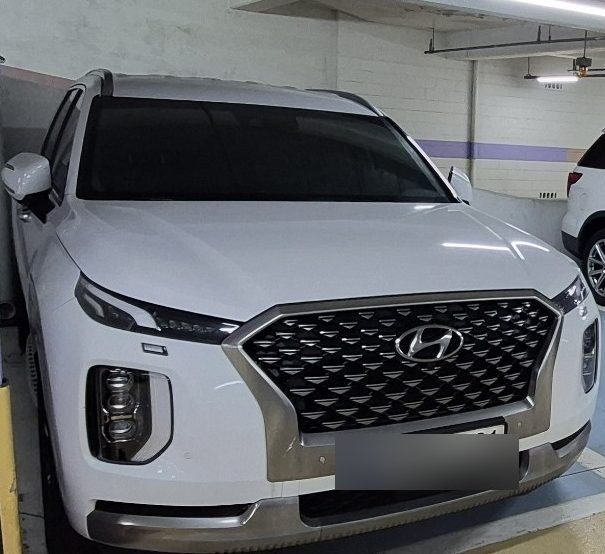
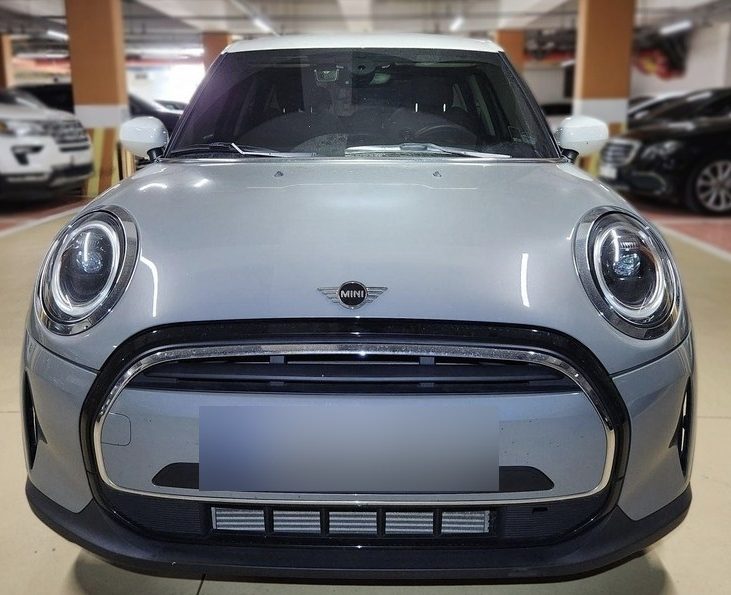
2022년형 팰리세이드. 3.8 가솔린 4WD 캘리그래피.2023년형 미니 쿠퍼 3세대(F56) 5도어. 아쉬움이 남는 쪽은 이쪽입니다.
팰리세이드 — 패밀리카라면서, 안전벨트를 3년째 안 고쳐줍니다
팰리세이드는 살고 싶어서 팔았습니다. 과장 같지만 진심입니다.
얼마 전 운전 중에 뒷자리에 앉은 아이가 “안전벨트가 풀렸다”고 말했습니다. 처음은 아니 었지만, 또 다시 심장이 내려앉았습니다. 달리는 중에, 뒷자리에서, 아이가.
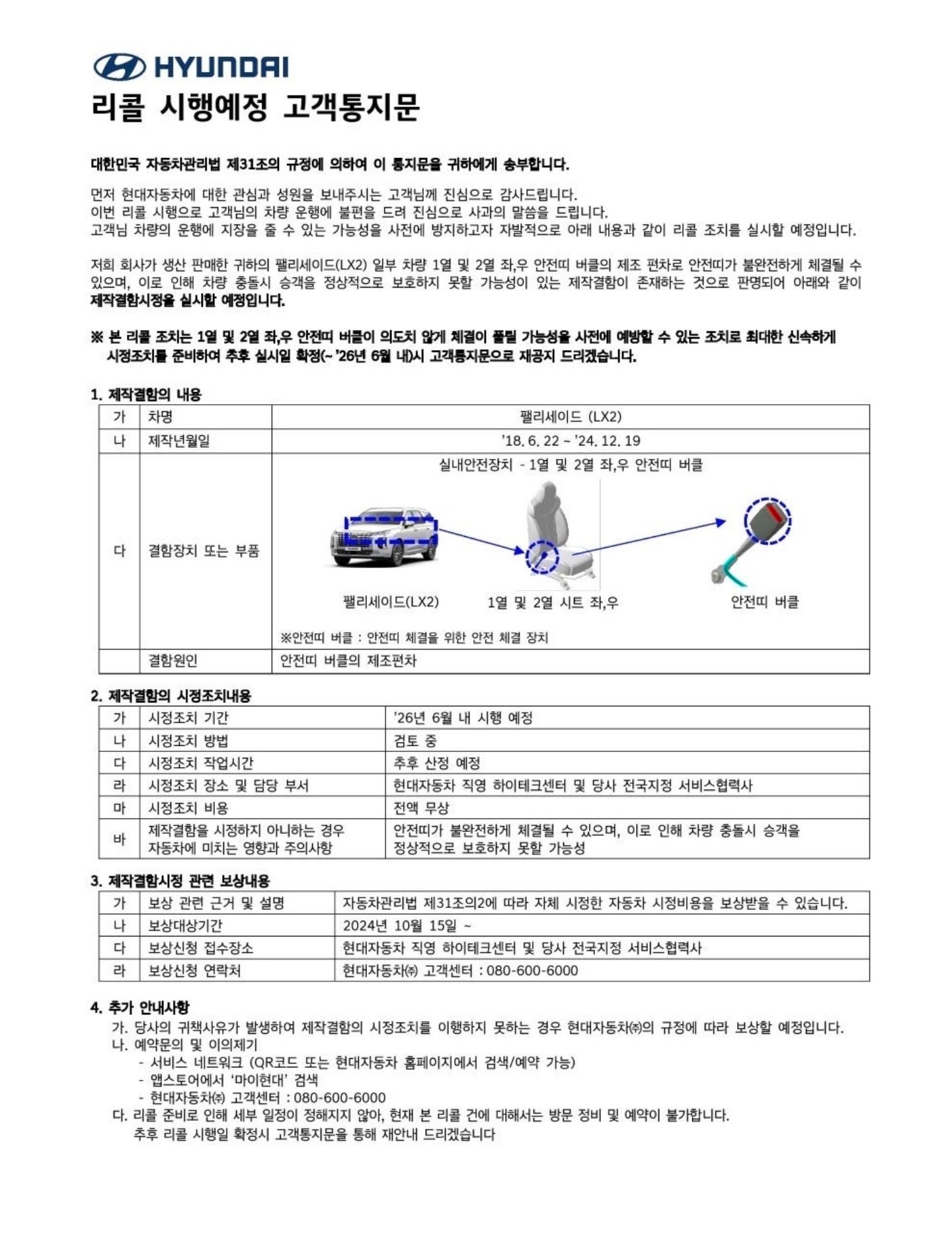
우연이 아닙니다. 이미 리콜 통지를 받은 사안이었습니다. 내용은 이렇습니다.
1차 통지문. 시정조치 기간 ‘26년 6월 내 시행 예정.
결함 내용 — 1열 및 2열 좌·우 안전띠 버클의 제조 편차로 안전띠가 불완전하게 체결될 수 있음
영향 — 차량 충돌 시 승객을 정상적으로 보호하지 못할 가능성
대상 — 2018년 6월부터 2024년 12월까지 생산된 팰리세이드(LX2)
문장을 그대로 읽어보면 이렇습니다. “사고가 나면 안전벨트가 사람을 못 잡아줄 수 있다.” 이보다 더 심각한 결함이 뭐가 있을까요.
그런데 이 리콜, 아직도 못 받았습니다. 1차 통지가 온 게 작년이었고, 시정조치 예정은 2026년 6월이었습니다. 역시나 최근에는 2차 통지가 있었습니다.
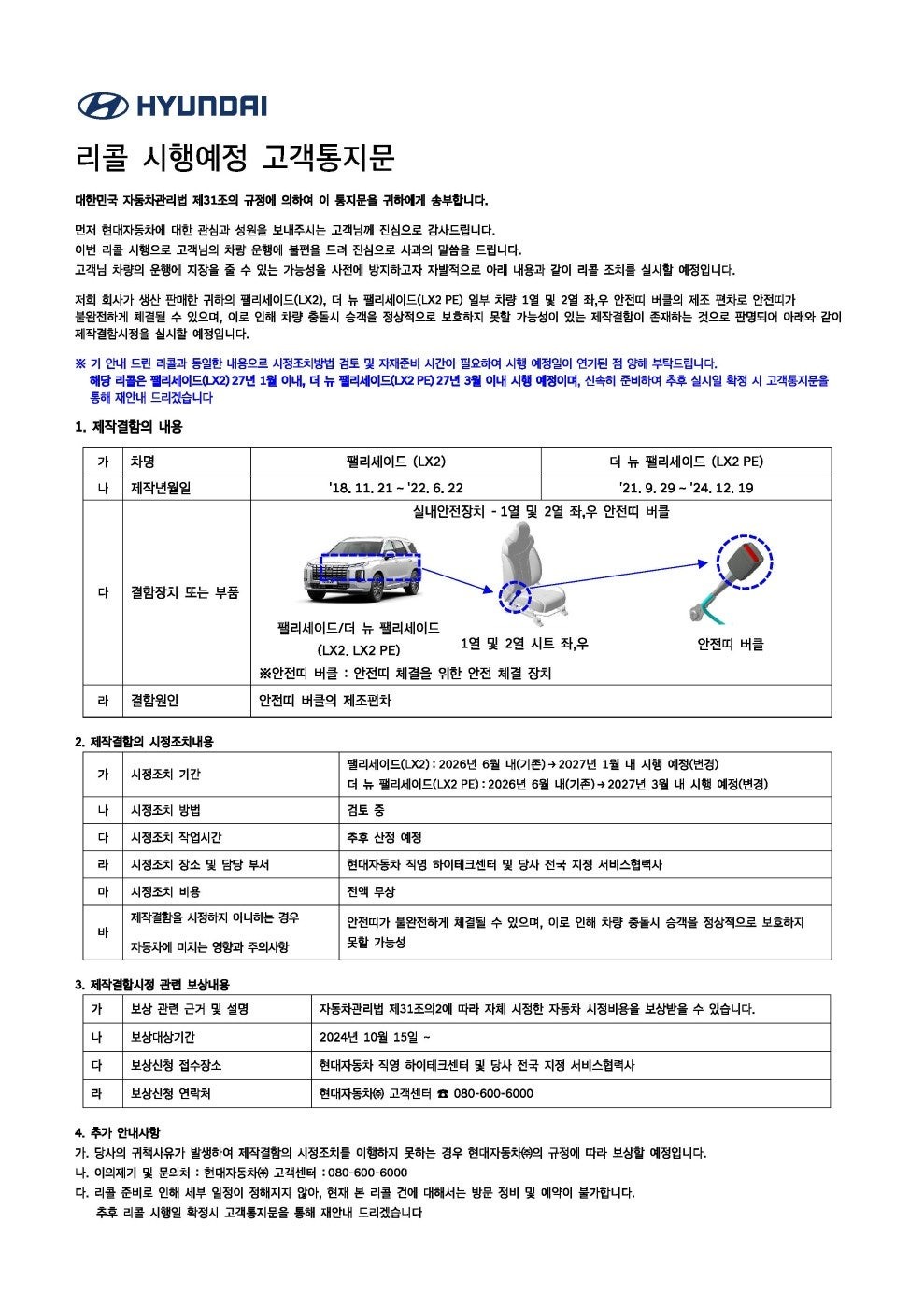
2차 통지문. 2026년 6월 → 2027년 1월로 연기.
내용은 연기 통보였습니다. 팰리세이드(LX2)는 2026년 6월에서 2027년 1월로 사유는 “시정조치 방법 검토 및 자재 준비 시간이 필요하다”는 것이었습니다.
시간 순으로 세어보면 이렇게 됩니다.
작년 — 1차 통지. “안전벨트에 결함이 있습니다”
올해 6월 예정 — 시정 예정이었으나 연기
내년 1월 — 새로 잡힌 시정 예정일
햇수로 3년차입니다. 그것도 확정이 아니라 “예정”이고, 통지문에는 “현재 본 리콜 건에 대해서는 방문 정비 및 예약이 불가합니다”라고 적혀 있습니다. 즉, 내가 먼저 고쳐달라고 찾아갈 수도 없습니다.
팰리세이드는 패밀리카로 팔리는 차입니다. 3열까지 있고, 아이와 함께 가족이 타는 차입니다. 그 차의 안전벨트 결함을 인정해 놓고, 고칠 날짜는 3년 뒤로 미루고, 그동안 예약조차 받지 않습니다. 부품 수급이 어렵다는 사정은 있을 수 있습니다. 하지만 “기다리세요”만 반복되는 동안, 그 위험은 오롯이 뒷자리에 앉은 아이 몫이었습니다.
그래서 팔았습니다. 차가 나빠서가 아니라, 기다릴 수가 없어서였습니다.
덧붙여, 엔진오일 이야기
현대차에 실망한 건 안전벨트만이 아니었습니다.
차를 팔려고 헤이딜러 검사를 받는 과정에서 엔진오일이 새고 있다는 사실이 드러났습니다. 딜러들은 대수롭지 않게 봤습니다. “보증기간 안이라 문제없다”는 것이었죠. 실제로 그렇습니다. 새 주인이 무상으로 고치면 됩니다.
제가 걸린 건 다른 부분입니다. 불과 몇 달 전인 4월에 정비를 받았습니다. 이것저것 ‘유상‘ 수리는 많이 받았습니다. 그런데 그때는 누유 이야기를 한마디도 듣지 못했습니다.
물론 그 사이에 생겼을 수도 있습니다. 타이밍이 나빴을 수도 있죠. 그런데 자꾸 같은 질문이 남습니다. 못 찾은 걸까, 안 찾은 걸까.
둘 중 무엇이어도 좋은 답은 아닙니다. 못 찾았다면 정비 품질의 문제고, 안 찾았다면 돈이 되지 않는 무상 항목이라 굳이 들추지 않은 것이 됩니다. 안전벨트 건을 겪은 뒤라 그런지, 저는 후자 쪽 의심을 지우기가 어려웠습니다.
잠깐 — 법은 어떻게 되어 있을까요
궁금해졌습니다. 제조사는 리콜을 언제까지 해줘야 하는 걸까? 그래서 「자동차관리법」을 찾아봤습니다. 참고로 제가 받은 통지문 첫 줄에도 “대한민국 자동차관리법 제31조의 규정에 의하여 이 통지문을 귀하에게 송부합니다”라고 적혀 있습니다.
제조사가 지켜야 하는 것
「자동차관리법」 제31조 제1항 — 안전에 지장을 주는 결함이 있으면, 그 사실을 안 날부터 지체 없이 결함 내용과 시정조치 계획을 공개하고 시정조치를 해야 합니다.
「자동차관리법 시행규칙」 제41조 제1항 — 결함을 안 날부터 30일 이내에 시정조치계획을 수립해서, 소유자에게 우편·문자로 통지하고 일간신문에 공고해야 합니다.
이 시정조치 계획에는 ‘부품 수급 계획’과 ‘전용 작업 공간 확보’ 같은 이행방안이 포함되어야 합니다. 즉, 법은 “부품이 없어서 못 고친다”는 상황을 이미 예상하고 있었다는 뜻입니다.
제31조 제5항 — 시정조치의 진행 상황을 국토교통부장관에게 보고해야 합니다.
제재 — 리콜 조치를 하지 않으면 해당 자동차·부품 매출액의 3% 이내 과징금을 물거나, 10년 이하의 징역 또는 1억 원 이하의 벌금에 처해질 수 있습니다(제74조, 제78조).
여기까지만 보면 꽤 엄격합니다. 그런데 자세히 보면 빠져 있는 것이 하나 있습니다.
법이 기한을 정해 둔 것은 ‘알리는 것’까지입니다. 30일 안에 계획을 세워서 통지하라는 것이죠. 그런데 “언제까지 실제로 고쳐야 한다”는 완료 기한은 없습니다. 부품 수급 계획을 계획서에 적어 내기만 하면 진행 중이라는 형식은 갖춰집니다. 1년이 걸리든 3년이 걸리든 말이죠.
제가 받은 2차 통지문이 정확히 그 모습입니다. “시정조치 방법 검토 및 자재 준비 시간이 필요하여 시행 예정일이 연기된 점 양해 부탁드립니다.” 이 한 줄로 7개월이 밀렸고, 법적으로는 아무 문제가 없습니다. 시정조치 방법 항목에는 아직도 “검토 중”이라고 적혀 있습니다. 결함을 인정한 지 1년이 지났는데 어떻게 고칠지도 아직 정해지지 않았다는 뜻입니다.
그러면 차주 쪽은 어떨까요
찾아보니 이쪽도 생각과는 조금 달랐습니다. 안전 리콜을 안 받았다고 해서 차주에게 직접 과태료가 나오지는 않습니다. 리콜 수리는 무상이지만, 받으라고 강제하는 규정은 없습니다.
대신 불이익은 다른 형태로 옵니다.
사고가 났을 때 — 결함이 원인인 사고라도, 리콜 통지를 받고도 시정하지 않았다면 과실 다툼의 소지가 생깁니다.
차를 팔 때 — 리콜 미시정 이력은 중고차 평가에서 감점 요인이 됩니다. 결국 제조사가 안 고쳐준 값을 파는 사람이 치릅니다.
정리하면 이런 구조입니다. 차주는 ‘안 고치면 손해를 감수하라’는 위치에 있고, 제조사는 ‘계획대로 하고 있다’고 말할 수 있으면 시간을 벌 수 있는 위치에 있습니다. 형사처벌 조항이 있어도 그건 리콜을 아예 안 했을 때의 이야기지, 늦게 할 때의 이야기가 아닙니다.
부품 수급에 시간이 걸리는 건 이해합니다. 문제는 그 공백 기간의 위험을 누가 떠안느냐입니다. 지금 구조에서는 전부 차주가 떠안습니다. 저는 그 위험을 뒷자리에 아이를 태우고 1년 넘게 지고 있었던 셈입니다.
알아두면 좋은 것
내 차 리콜 대상 조회 — 자동차리콜센터(car.go.kr)에서 차량번호나 차대번호로 확인할 수 있습니다. 결함 신고도 여기서 합니다.
내 돈으로 먼저 고쳤다면 — 「자동차관리법」 제31조의2에 따라 자비로 시정한 비용을 보상받을 수 있습니다. 제가 받은 통지문에도 보상대상기간이 2024년 10월 15일부터라고 명시되어 있습니다. 차를 이미 판 뒤라도 보유 기간 중에 수리했다면 대상이 됩니다.
중고차를 살 때 — 리콜 이력과 시정 여부를 반드시 확인하세요. 미시정 상태로 넘어오면 그 부담은 새 주인 몫입니다.
※ 법률 전문가가 아닌 차주 입장에서 조문을 찾아 정리한 것입니다. 구체적인 사안은 국토교통부나 자동차리콜센터, 법률 전문가에게 확인하시기 바랍니다.
미니 — 재미있는 차였지만, 아이가 자랐습니다
미니는 반대입니다. 아무 불만이 없었습니다. 정말 재미있는 차였습니다. 혼자 타거나 둘이 탔다면 지금도 계속 탔을 겁니다.
문제는 아이가 커버렸다는 것입니다. 초등학생일 때는 뒷자리가 좁아도 그러려니 했는데, 중학생이 되니 이야기가 달라졌습니다. 다리가 안 들어갑니다. 잠깐 마트 다녀오는 정도면 몰라도, 조금만 멀리 가면 뒷자리에서 원성이 나옵니다.
차는 그대로인데 사람이 자라서 안 맞게 되는 경우가 있습니다. 미니가 딱 그랬습니다. 아쉽지만 보냈습니다.
현대 인증중고차 — ‘직매입’을 기대했는데, 결국 딜러 경매였습니다
팰리세이드는 처음에 현대 인증중고차에 의뢰했습니다. 주변에서 “제조사가 직접 사주는 거라 낫다”는 이야기를 들었기 때문입니다.
그런데 막상 진행해 보니 제 차는 직매입 대상이 아니라고 했습니다. 결국 딜러들이 붙어서 경매를 하는 방식으로 넘어갔습니다. 이럴 거면 굳이 여기를 거칠 이유가 없었던 셈입니다.
그리고 가격이 좋지 않았습니다. 국산차는 가격 방어가 잘 된다는 말을 많이 들었는데, 실제로 제시받은 금액을 보고는 그 말이 무색해졌습니다. 그래서 여기서 팔지 않고 헤이딜러로 옮겼습니다.
헤이딜러 — 일반 경매와 역경매를 ‘순서대로’ 쓰는 게 핵심입니다
헤이딜러에는 두 가지 방식이 있습니다.
일반 경매 — 차를 올리면 딜러들이 각자 가격을 써내고, 그중에서 제가 고르는 방식
역경매 — 제가 먼저 “이 가격이면 팝니다”라고 제시하고, 응할 딜러가 나오면 성사되는 방식
써보고 나서 얻은 결론은 이겁니다. 둘 중 하나를 고르는 게 아니라, 순서대로 쓰는 게 좋습니다.
먼저 일반 경매를 돌려서 내 차의 실제 시장가를 확인합니다.
그 금액에 조금 얹어서 역경매 가격을 제시합니다.
응하는 딜러가 있으면 시세보다 높게 팔리고, 없으면 일반 경매 최고가로 팔면 됩니다.
아무 정보 없이 역경매부터 던지면 기준이 없어서 너무 낮게 부르거나, 반대로 아무도 응하지 않는 금액을 부르게 됩니다. 일반 경매는 시세 조사용, 역경매는 그 위를 노리는 용도로 쓰는 게 실용적이었습니다.
미니는 엔카와 헤이딜러를 붙여봤습니다
미니는 엔카와 헤이딜러 양쪽에 동시에 올렸습니다. 결과는 헤이딜러가 더 높은 금액을 제시했습니다.
플랫폼마다 붙는 딜러 풀이 다르니 항상 같은 결과가 나오지는 않을 겁니다. 다만 한 군데만 올려놓고 그게 시세라고 믿는 건 손해라는 건 확실합니다. 두 군데 올리는 데 드는 추가 수고는 검사 한 번 더 받는 정도입니다.
검사원 방문 경험은 플랫폼마다 달랐습니다
사소해 보이지만 의외로 인상에 남는 부분이었습니다.
헤이딜러 — 비즈니스 캐주얼 차림으로 방문
현대 인증중고차 — 비슷한 수준
엔카 — 중고차 딜러 느낌
물론 겉모습이 실무 능력을 말해주지는 않습니다. 다만 플랫폼의 인상은 결정 합니다.
입찰가 분포를 꼭 보세요 — 절반 값을 써내는 딜러가 있습니다
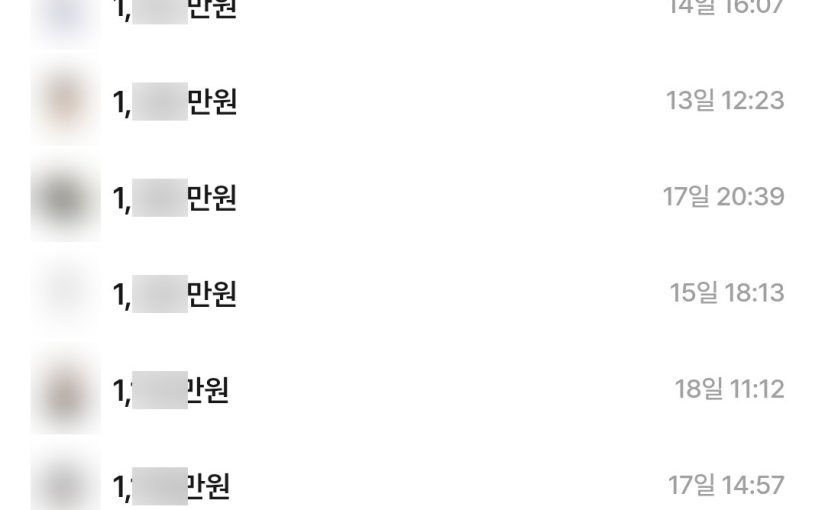
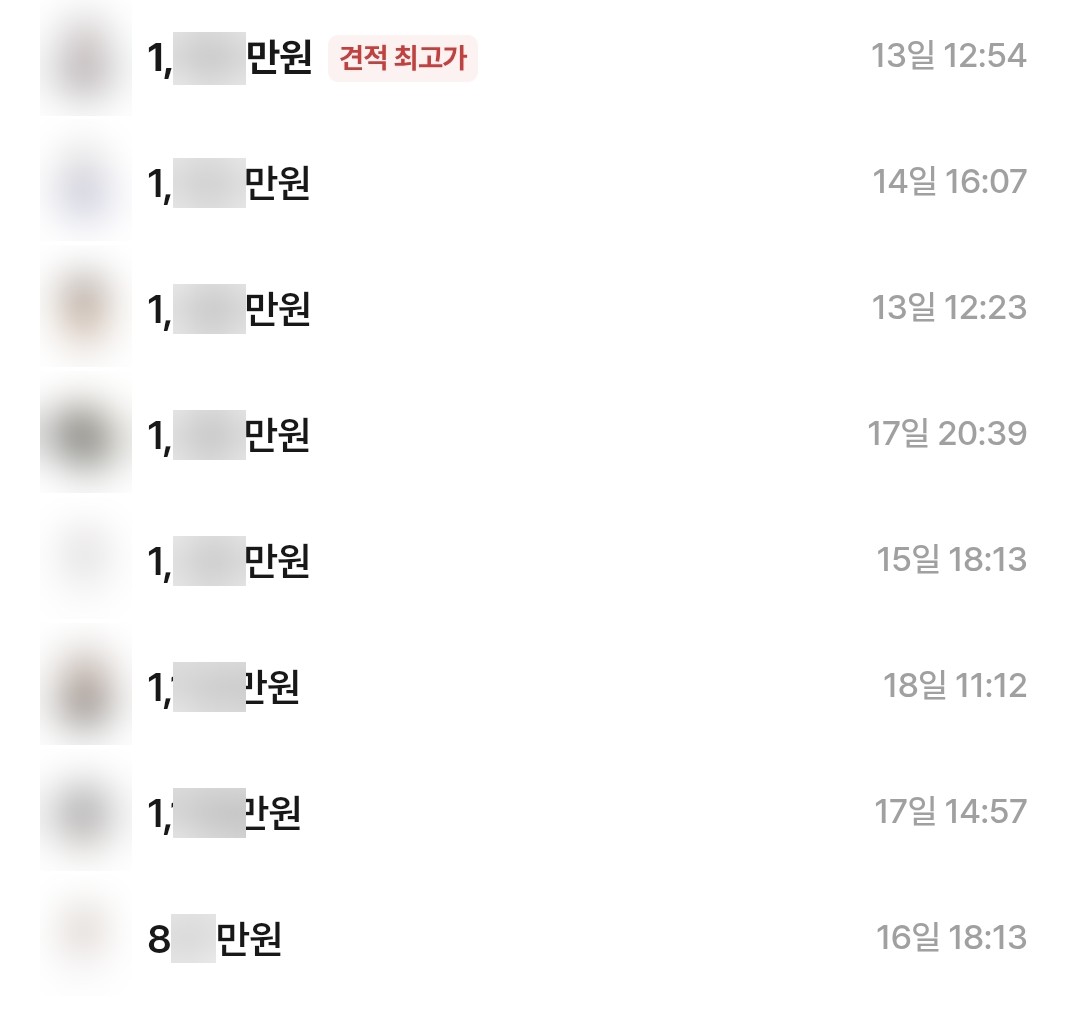
경매를 돌려보고 가장 의아했던 부분입니다. 미니를 엔카에 올렸을 때 붙은 견적 목록입니다. 금액은 가렸지만 자릿수는 그대로이니 분위기는 전해질 겁니다.
같은 차, 같은 점검 결과에 붙은 견적들. 맨 아래 하나만 자릿수가 다릅니다.
위에서부터 일곱 개는 모두 1,000만원대입니다. 조금씩 낮아지긴 해도 흐름이 있습니다. 그런데 맨 아래 하나가 800만원대입니다. 최고가와 비교하면 거의 반값이고, 바로 위 견적과도 뚝 끊어질 만큼 차이가 납니다.
이걸 “차 상태를 다르게 평가했다”로 설명하기는 어렵습니다. 차는 하나고 점검 결과도 하나니까요. 그보다는 진짜 생각하는 가격은 감춰두고, 일단 절반쯤 되는 금액을 던져보는 경우가 있다고 보는 쪽이 자연스러워 보입니다. 어쩌다 걸리면 크게 남는 거래고, 안 걸려도 잃을 게 없으니까요.
솔직히 정확한 이유는 저도 모릅니다. 실적을 채우려는 건지, 그냥 찔러보는 건지, 제가 모르는 다른 계산이 있는 건지. 다만 시세를 모르는 사람이 “딜러가 제시한 금액이니 그게 시세겠지” 하고 받아들였다면, 이 한 건으로 수백만 원이 날아갔을 겁니다.
그래서 얻은 교훈은 이렇습니다.
최고가 하나만 보지 마세요. 목록 전체를 펼쳐놓고 봐야 합니다.
견적들이 몰려 있는 구간이 진짜 시세입니다. 이 경우엔 일곱 개가 한 구간에 모여 있었습니다.
극단값은 정보가 아니라 노이즈입니다. 터무니없이 낮은 값에 놀라서 “내 차가 이 정도인가” 하고 흔들릴 필요가 없습니다.
그래서 최소 두 곳에 올려봐야 합니다. 한 군데 결과만 보면 그 노이즈가 시세처럼 보입니다.
그래서 얼마에 팔렸나 — ‘국산차 가격 방어’ 신화에 대하여
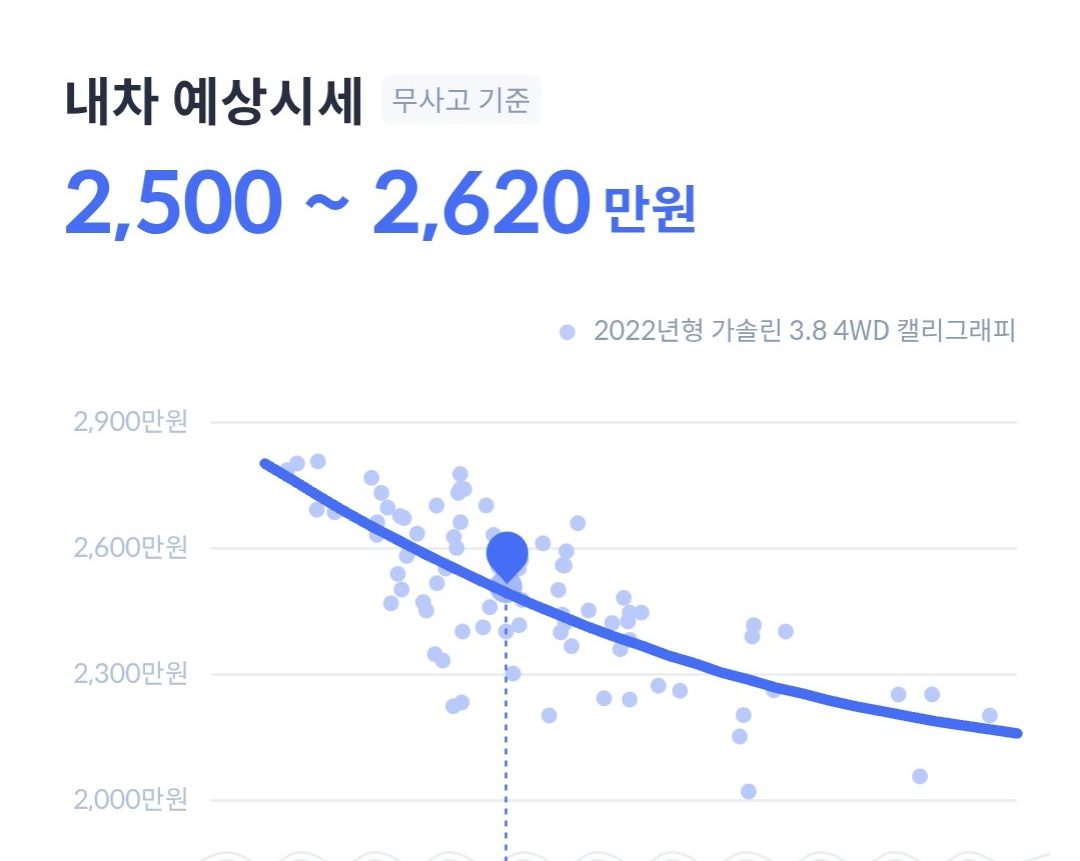
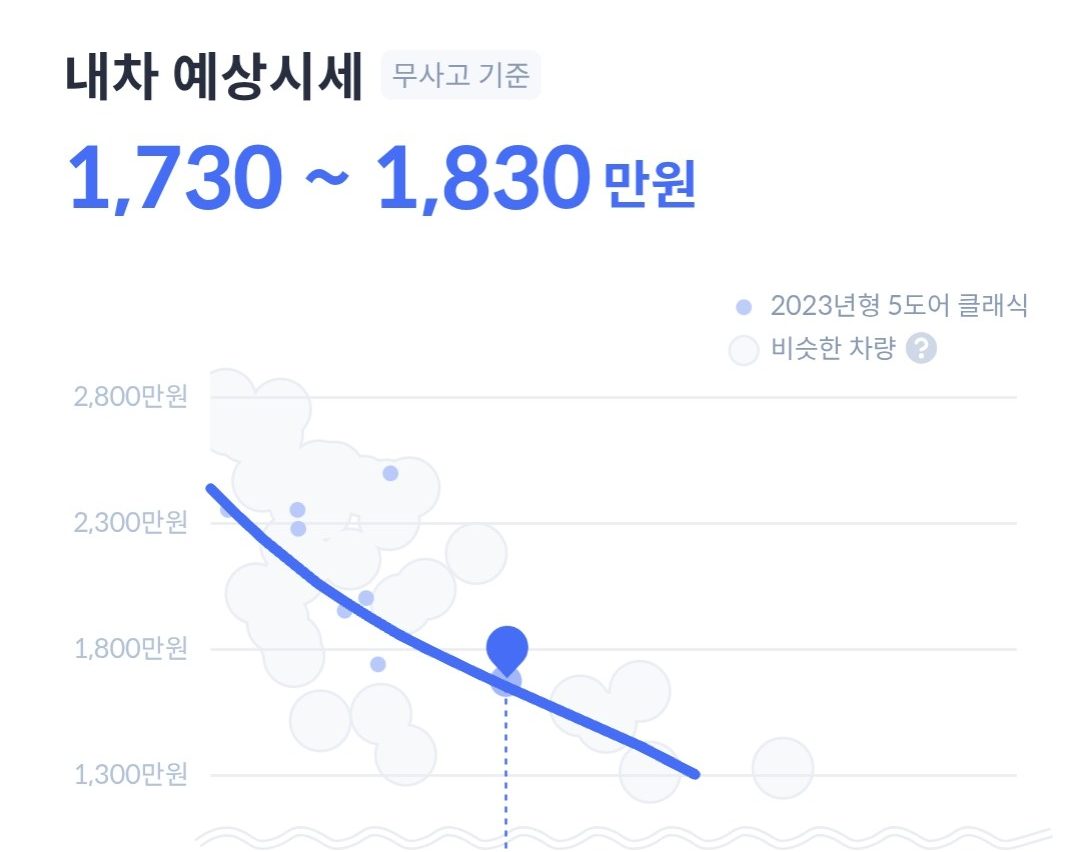
헤이딜러는 경매를 올리기 전에 ‘내 차 예상시세’를 보여줍니다. 비슷한 조건의 차량 분포 위에 내 차 위치를 찍어주는 방식입니다.
신차 가격 대비로 환산하면 차이가 더 선명합니다. 두 대 모두 5년 이내, 보증기간 안에 있는 차였는데도 이렇습니다.
팰리세이드 — 감가율 약 60~70%. 3.8 가솔린 4WD에 정품 옵션까지 넣은 가격 기준입니다.
미니 — 감가율 약 50%대.
팰리세이드는 왜 예상시세보다 낮았을까
확인할 방법은 없지만, 짐작은 갑니다. 매수자 입장에서 이 차를 한번 봐보겠습니다.
안전벨트 결함으로 리콜 대상인 차량이다.
그런데 그 리콜은 아직 시행되지 않았고, 언제 될지도 “예정”일 뿐이다.
게다가 엔진오일 누유가 있다.
이런 차를 사고 싶을까요. 보증기간 안이라 고치는 데 돈은 안 들지만, 서비스센터를 오가야 하는 사람은 새 주인입니다. 안전벨트는 그마저도 예약이 안 됩니다. 딜러 입장에서는 그 번거로움과 불확실성만큼 값을 깎을 이유가 생깁니다.
결국 제조사가 미뤄둔 숙제의 값을, 파는 제가 치른 셈입니다. 앞에서 “리콜 미시정의 비용은 차주가 부담한다”고 썼는데, 그게 추상적인 이야기가 아니었습니다. 매도가에 숫자로 찍혔습니다.
“국산차는 가격 방어가 된다”는 말을 저도 오래 믿었습니다. 그런데 제 경우에는 수입 소형차 쪽이 오히려 덜 떨어졌습니다. 특히 비싸게 주고 넣은 정품 옵션이 중고 시세에는 거의 반영되지 않는다는 게 체감으로 확인됐습니다. 옵션값은 사실상 신차 살 때 한 번 쓰고 사라지는 돈에 가깝습니다.
진행 순서 — 검사 → 경매 등록 → 매매
실제 흐름은 단순합니다.
차량 검사 — 검사원이 방문해서 차 상태를 점검하고 사진을 찍습니다.
경매 등록 — 검사 결과가 딜러들에게 공개되고 입찰이 시작됩니다.
매매 — 낙찰된 뒤 차량을 인도하고 대금을 받습니다.
걱정했던 현장 재감가는 없었습니다. 흔히 “막상 가면 트집 잡아서 깎는다”는 이야기를 듣는데, 제 경우엔 그런 일이 아예 발생할 수 없는 구조였습니다. 낙찰된 딜러가 오는 게 아니라, 제3자가 와서 차만 가져갑니다. 흥정할 사람 자체가 현장에 없습니다. 이 점은 확실히 편했습니다.
가장 귀찮았던 것 — 명의이전과 보험
전체 과정에서 스트레스의 90%는 여기서 나왔습니다. 가격도, 검사도, 인도도 아니었습니다. 보험이었습니다.
차는 넘겼는데 보험은 못 끊습니다
차를 넘겨도 명의이전이 끝날 때까지는 제 명의의 차입니다. 그래서 보험을 유지해야 합니다. 이미 제 손을 떠나서 제가 몰 일도 없는 차인데 말이죠.
매도로 끝나는 경우라면 그래도 낫습니다. 문제는 ‘대차’, 즉 새 차를 사면서 기존 차를 파는 경우입니다. 신차 보험과 기존 차 보험의 날짜를 정확히 맞춰야 하는데, 명의이전이 언제 끝날지 모르니 맞출 수가 없습니다. 그래서 저는 결국 단기보험을 따로 들었습니다.
“며칠쯤은 비워도 되지 않나?” — 아니었습니다
저도 그렇게 알고 있었습니다. 어차피 내가 몰 차도 아닌데 며칠쯤은 그냥 비워둬도 되는 것 아닌가. 찾아보니 아니었습니다.
의무보험은 하루만 비어도 과태료 대상입니다. 자가용 기준으로 미가입 기간이 10일 이내면 대인배상Ⅰ 1만 원 + 대물배상 5천 원, 합쳐서 1만 5천 원입니다. 10일을 넘기면 1일마다 대인 4천 원·대물 2천 원씩 붙고, 상한은 각각 60만 원·30만 원입니다(「자동차손해배상 보장법」 제48조, 시행령 별표5).
대신 ‘양도’에는 별도 장치가 있습니다. 같은 법 제26조 제1항에 따라, 의무보험에 가입된 차를 양도하면 양도일(대금을 받고 실제로 차의 점유를 넘긴 날)부터 이전등록 신청기간이 끝나는 날까지 양수인이 양도인의 의무보험 계약상 권리의무를 승계합니다. 이전등록 신청기간은 「자동차관리법」 제12조에 따라 매수한 날부터 15일입니다. 양수인이 그 전에 자기 책임보험을 새로 들면 그 계약 체결일까지고요.
여기서 표현이 중요합니다. “며칠은 무보험이어도 봐준다”가 아니라, “그 기간에는 내 보험을 차 사간 사람이 대신 쓴다”는 뜻입니다. 안전망이 있는 건 맞는데, 그 안전망의 정체가 결국 내 보험입니다.
그래서 제가 먼저 해지해버리면 승계할 계약 자체가 사라지고, 공백은 고스란히 제 앞으로 남습니다. 보험 해지 기준일을 ‘이전등록일’로 잡으라는 조언이 여기저기 나오는 게 그 때문입니다. 참고로 이 승계가 지켜주는 건 의무보험(대인배상Ⅰ·대물배상)까지입니다.
결국 제도가 상정한 그림은 “15일이면 명의이전이 끝난다”입니다. 그 전제가 맞으면 아무 문제가 없습니다. 문제는 제 경우처럼 그게 언제 끝날지 차주는 알 수 없다는 데 있습니다.
단기보험 팁 — 무조건 최장으로 들고 환불받으세요
이건 직접 겪고 알게 된 건데, 알아두면 돈이 되는 이야기입니다.
삼성화재 기준으로 단기보험은 7일 / 15일 / 1개월 단위로 끊깁니다. 즉 1일을 들어도 7일 요금, 8일을 들어도 15일 요금입니다. 중간이 없습니다.
그렇다면 답은 정해져 있습니다. 일단 최장 기간으로 가입하고, 명의이전이 일찍 끝나면 해지해서 일할 계산으로 환불받으세요. 짧게 들었다가 모자라서 다시 드는 것보다 훨씬 낫습니다. 명의이전이 며칠에 끝날지는 아무도 모르기 때문입니다.
실제로 얼마나 걸렸나
팰리세이드(헤이딜러 딜러) — 1주일이 넘게 걸렸습니다. 그것도 다음 차 일정 때문에 제가 헤이딜러에 컴플레인을 넣어서 그 정도로 마무리된 겁니다. 하필 그때 전산 오류가 있었다고는 하는데, 미리 처리했으면 됐을 일이라는 생각을 지우기 어렵습니다.
미니(중고상) — 명의이전 자체는 당일에 한 것으로 보이는데, 서류를 늦게 올려줬습니다. 그래서 저는 그 사실을 모른 채 단기보험을 들었습니다. 안 들어도 됐을 돈이었습니다.
두 경우 모두 원인이 같습니다. 차주는 명의이전이 언제 끝나는지 실시간으로 알 수 없습니다. 그래서 최악을 가정하고 보험을 들 수밖에 없고, 그 비용은 차주가 냅니다.
이건 플랫폼이 해결해줄 수 있는 문제 같습니다
가격을 몇십만 원 더 받는 것보다, 이 구간을 없애주는 게 훨씬 큰 경쟁력이라고 생각합니다.
인도 시점부터 명의이전 완료까지를 플랫폼이 자체 보험으로 커버하거나
최소한 단기보험 가입을 앱 안에서 대행해주면 좋겠습니다.
경매 UI는 훌륭한데, 정작 사용자가 가장 헤매는 이 마지막 구간이 비어 있습니다.
한 가지 더 걸렸던 것 — 내가 볼 수 없는 ‘딜러만 보이는 의견’
헤이딜러는 경매에 올릴 때, 검사원이 ‘딜러들에게만 보이는 주관적 의견’을 적을 수 있다고 합니다. 그리고 차주인 저는 그 내용을 알 수도, 볼 수도 없습니다.
객관적인 점검 항목이라면 이해합니다. 주행거리, 사고 이력, 부품 교체 이력 같은 건 숫자와 기록으로 남는 것이니까요. 그런데 ‘주관적 의견’은 다릅니다. 그 한 줄에 따라 입찰가가 수십만 원, 많게는 수백만 원 움직일 수 있는데, 정작 내 차에 대해 무슨 말이 쓰였는지 나만 모릅니다.
이건 반박할 기회조차 없다는 뜻이기도 합니다. 사실과 다른 내용이 적혀 있어도 저는 알 수 없으니 정정을 요청할 수도 없습니다. 딜러 입장에서 솔직한 정보가 필요하다는 취지는 이해합니다. 하지만 최소한 차주에게도 같은 내용을 보여주고, 이의가 있으면 말할 수 있게 해주는 게 맞다고 생각합니다. 정보를 비대칭으로 두는 순간, 그 비용은 결국 파는 사람이 부담하게 됩니다.
두 차는 어디로 갔을까
파는 사람 입장에서는 마지막까지 궁금한 부분입니다.
팰리세이드 — 정황상 러시아로 수출된 것으로 보입니다.
미니 — 국내 중고차 상인이 사갔습니다.
팰리세이드가 수출로 나갔다는 건 생각해 보면 씁쓸합니다. 안전벨트 리콜이 아직 안 끝난 차가 국경을 넘었다는 뜻이니까요. 국내에서는 그래도 통지문이라도 오지만, 그 너머에서는 어떻게 될지 알 수 없습니다.
정리하며
제조사 인증중고차가 항상 유리한 건 아닙니다. 직매입이 아니라면 결국 딜러 경매고, 가격도 특별히 좋지 않았습니다.
플랫폼은 최소 두 곳 이상 붙여보세요. 미니는 엔카보다 헤이딜러가 높았습니다.
일반 경매로 시세를 파악한 뒤, 역경매로 그 위를 노리세요. 순서가 중요합니다.
최고가 하나만 보지 마세요. 이상한 금액을 써내는 딜러가 섞여 있습니다.
국산차 가격 방어라는 말은 반쯤만 믿으세요. 제 경우엔 미니 쪽이 덜 떨어졌습니다.
옵션값은 중고에서 거의 회수되지 않습니다. 신차 살 때 감안하세요.
미시정 리콜과 미수리 항목은 매도가를 끌어내립니다. 보증기간 안이라 무상이어도, 그 번거로움만큼 값이 깎입니다.
대차를 계획한다면 보험 공백을 미리 준비하세요. 단기보험은 최장으로 들고 환불받는 쪽이 유리합니다.
그리고 리콜은 차를 살 때 반드시 확인하세요. 고쳐줄 의지와 능력이 있는지가 진짜 문제입니다.
차 두 대를 정리하고 나니 마음이 좀 이상합니다. 미니는 아쉬움이 남고, 팰리세이드는 아쉬움보다 안도감이 큽니다.
좋은 차를 만드는 것만큼, 문제가 생겼을 때 고쳐주는 것도 자동차 회사의 실력이라는 걸 이번에 확실히 배웠습니다. 안전벨트 결함을 인정해 놓고 3년째 “검토 중”이라고 적어 보내는 회사라면, 다음 차를 고를 때 제가 어떤 선택을 할지는 이미 정해진 셈입니다.
※ 이 글은 개인 경험을 정리한 것으로, 특정 업체를 홍보하거나 비방할 목적이 없습니다. 차량 상태와 시기, 보험사 상품 조건에 따라 결과는 달라질 수 있습니다.
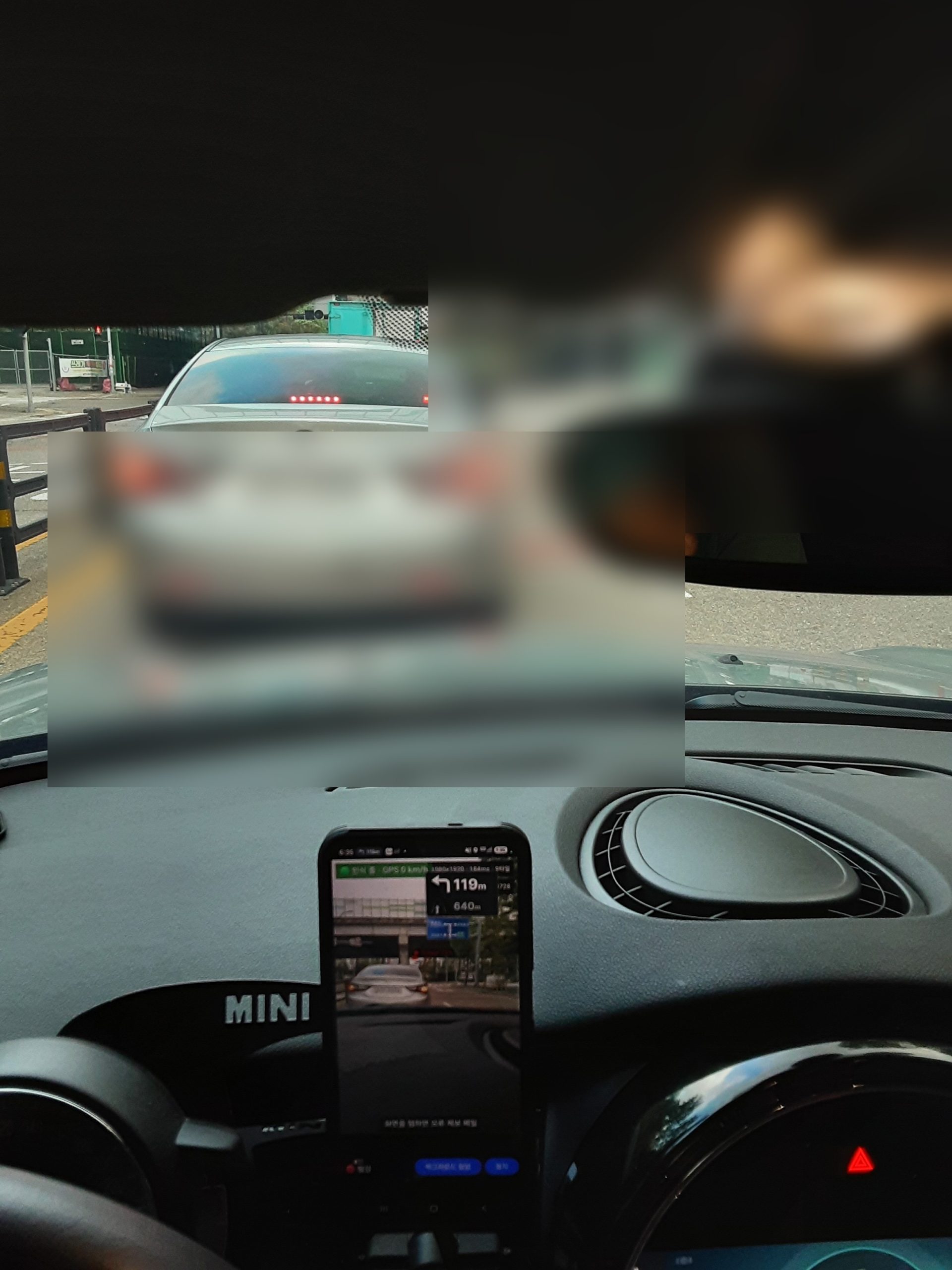
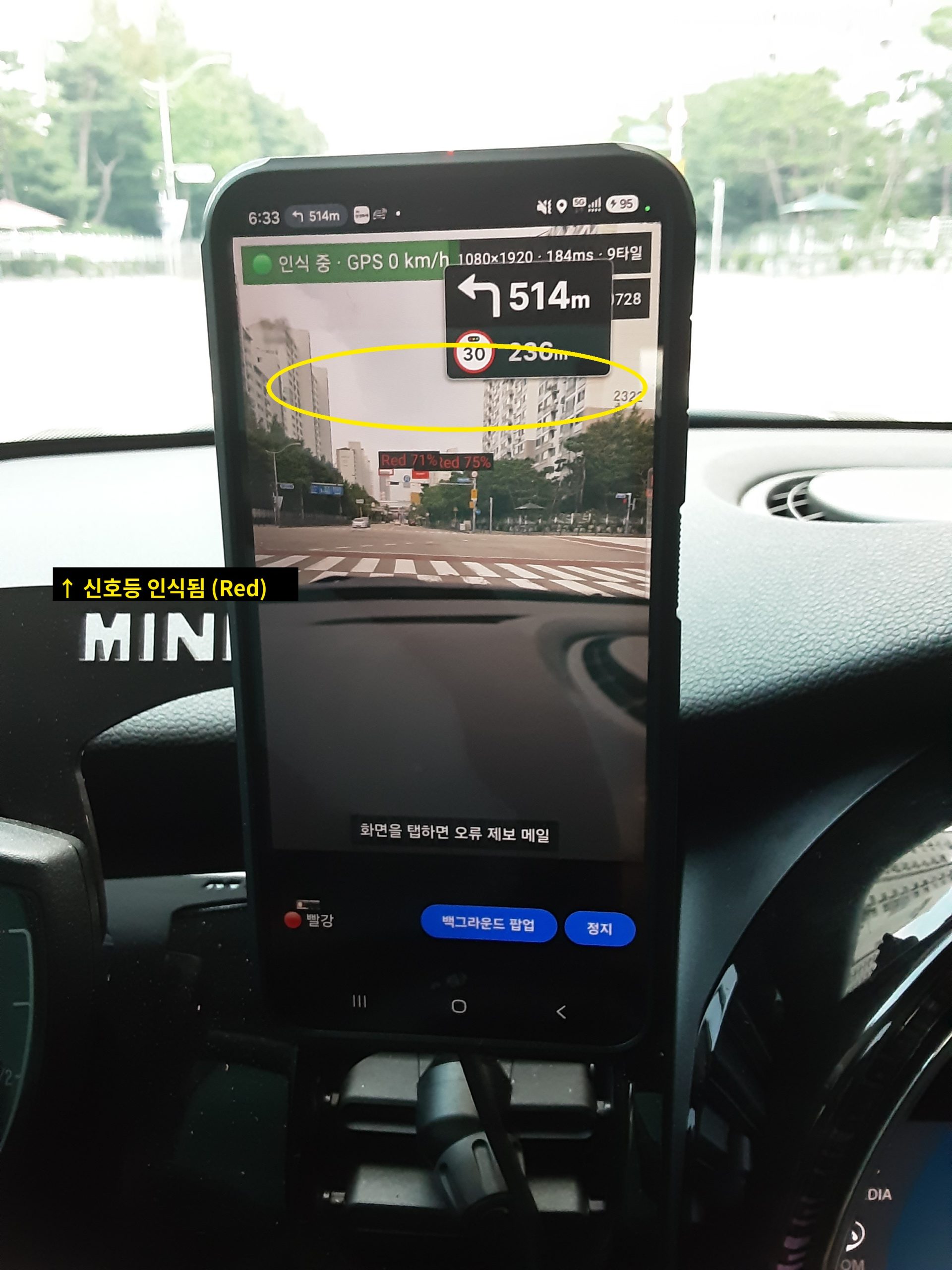
. 정지선에 맞춰 서면 오히려 신호등이 시야 밖으로 사라지는 구조
. 신호등이 차량 바로 위쪽 각도에 위치, 앞유리 상단 프레임에 가려짐
. 고개를 숙이거나 앞으로 밀고 나가야만 신호 확인이 가능한 상황이 매번 반복
. 이 불편함이 trafficlight 앱 제작의 시작점
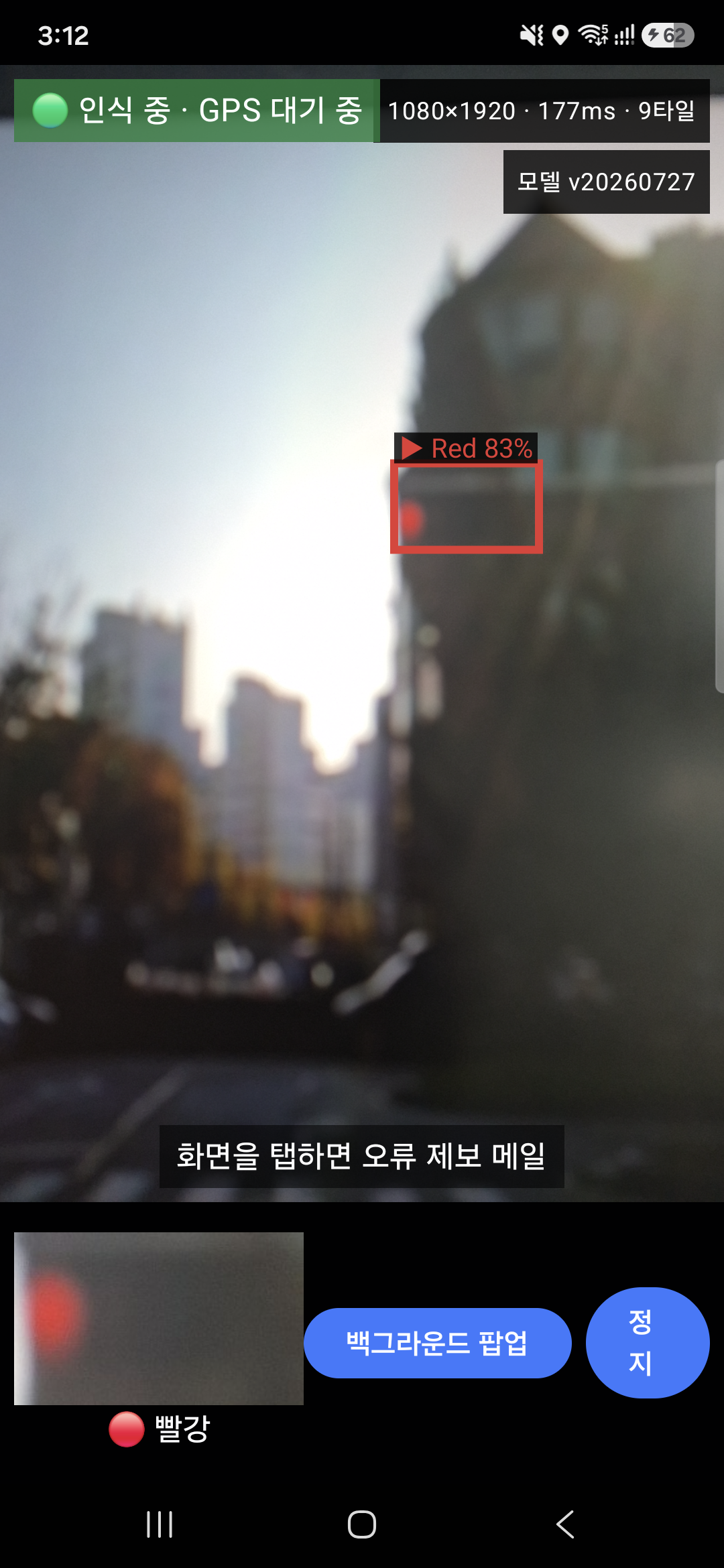
사람 눈에는 신호등이 잘 안 보이는 상황핸드폰 화면에서는 신호등이 인식됨 (Red)
1. 아이디어의 시작 – 벤츠
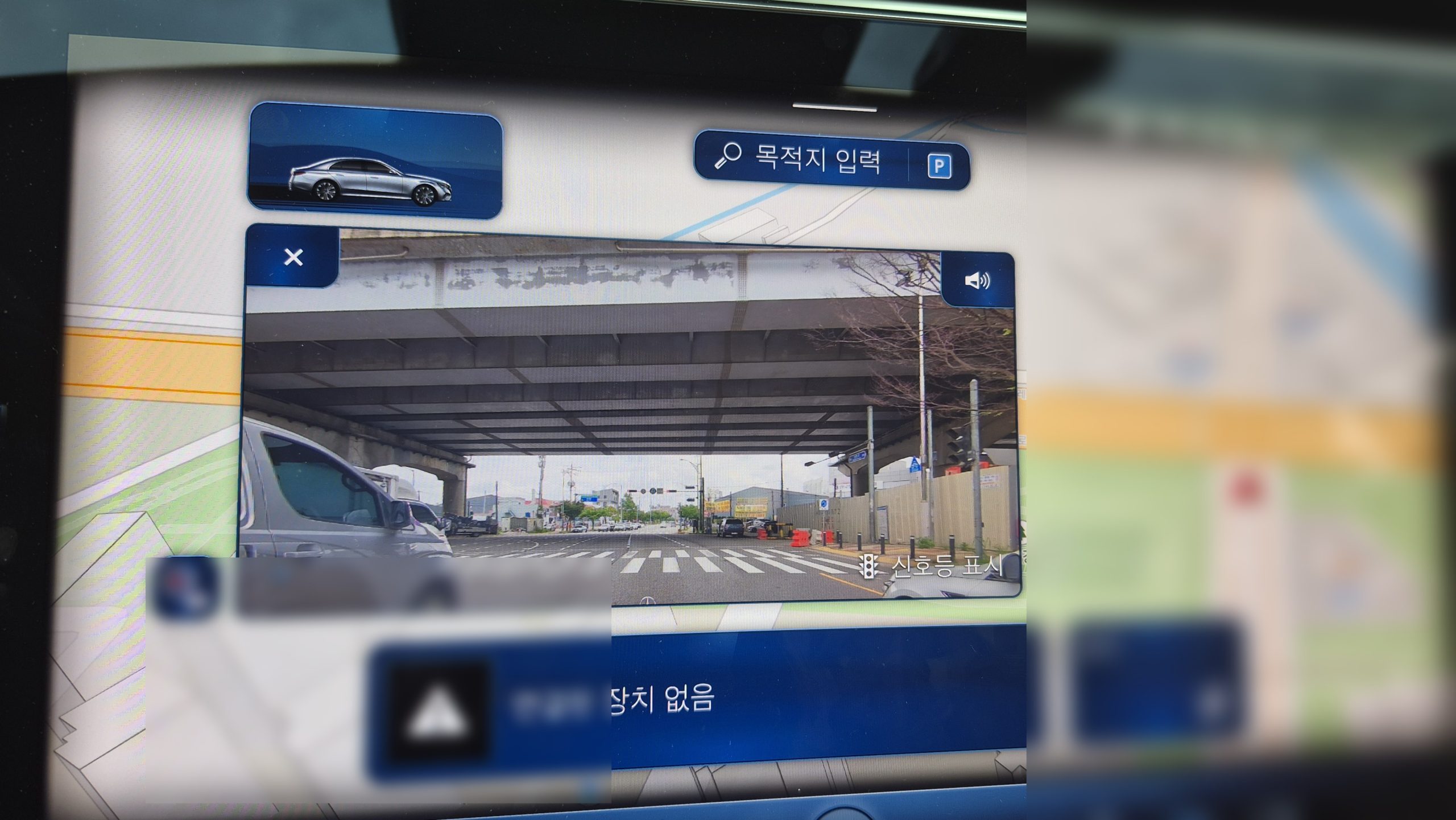
. 벤츠 일부 모델 – 정지 시 전면 카메라 화면을 UI(클러스터/센터 디스플레이)에 표시. HUD 아님
. 다만 카메라 영상만 보여줄 뿐, 신호등 인식 기능은 없음
. “정지 시 화면으로 앞을 보여준다”는 아이디어에서 착안 → 신호등 인식 기능 추가가 trafficlight 앱의 출발점
벤츠 – 정지 시 센터 디스플레이에 표시되는 전면 카메라 화면 (“신호등 표시” 옵션)
2. 사용법 – 실시간 온디바이스 인식
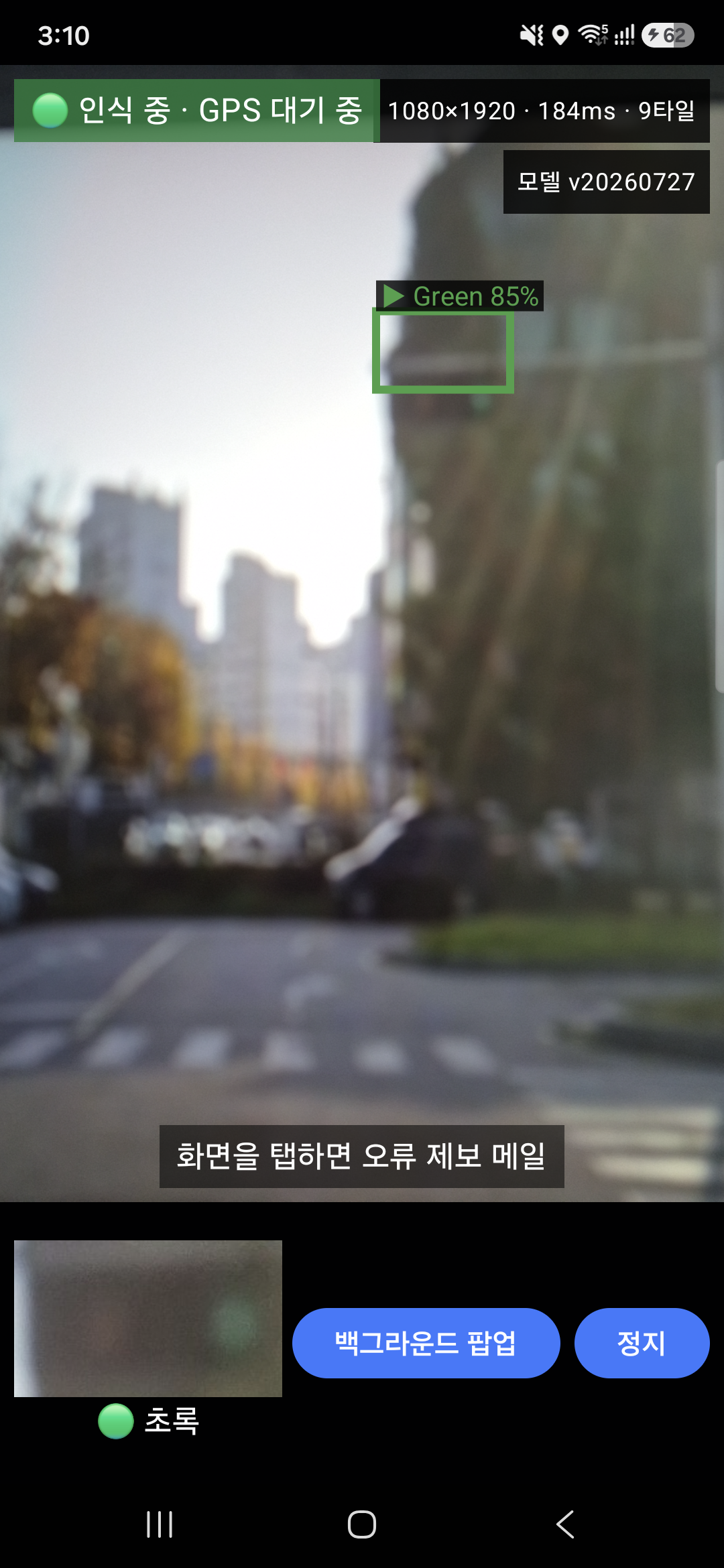
. 앱 실행 → 카메라 화면에서 실시간으로 신호등 인식 (온디바이스, 서버 전송 없음)
. 인식 결과(빨강/초록)와 신뢰도를 화면에 바로 표시
. 인식이 잘 안 되는 경우 – 화면을 탭하면 해당 화면이 오류 제보 메일로 전송 → 모델 개선에 활용
실제 동작 영상
빨간불 인식 (Red 83%)초록불 인식 (Green 85%)
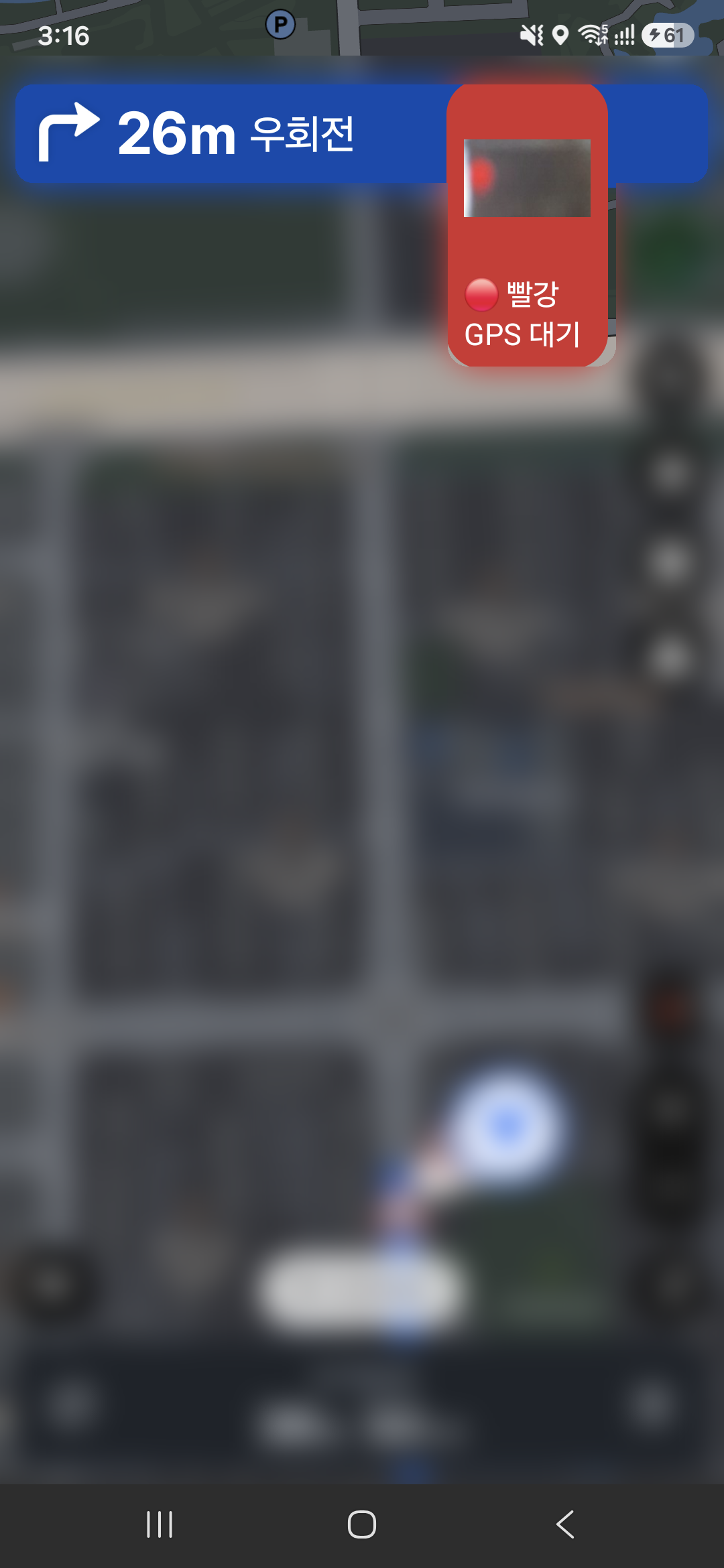
. 화면을 계속 켜두지 않아도 되도록 백그라운드 팝업 모드도 지원 – 네비게이션 등 다른 앱 위에 작은 창으로 오버레이되어 인식 결과를 계속 보여줌
백그라운드 팝업 – 네비게이션 앱 위에 오버레이된 모습
3. Vibe Coding으로 개발
. 이번에도 바이브코딩 방식으로 진행
. 처음부터 완벽한 설계보다, AI와 대화하며 빠른 프로토타입 제작 후 반복 수정하는 방식
. 아이디어에서 실제 앱까지 걸리는 시간 대폭 단축
4. 인식률 개선
. 인식 모델은 YOLO 사용
. 현재 배포 모델(yolov8n, custom_data 재학습) – mAP50-95 0.7141, Red recall 0.9434
. 쉽게 말해, 빨간불은 100번 중 약 94번 잡아내는 수준
. .pt → ONNX → onnx2tf 변환을 거쳐 float16 가중치(float32 입출력)로 온디바이스 배포
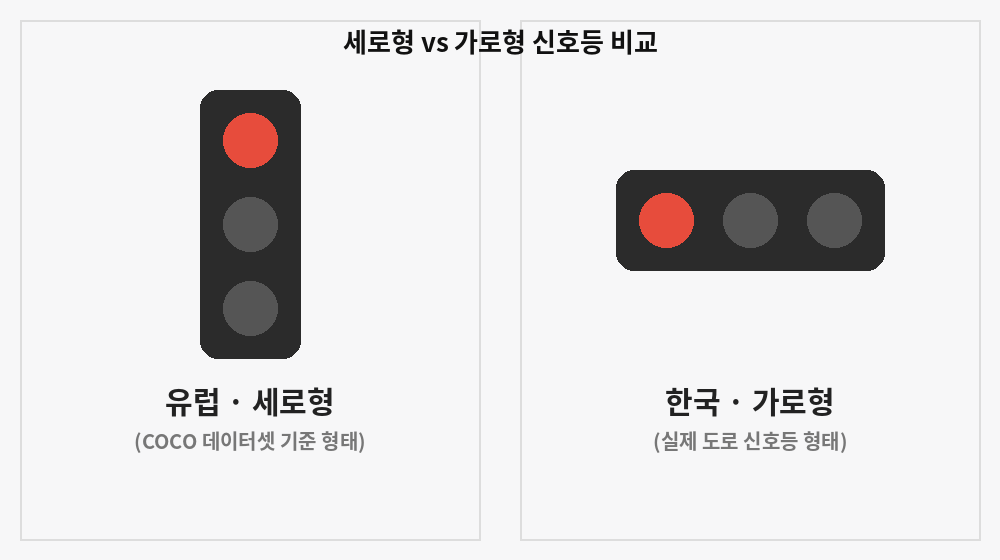
4.1 COCO 데이터셋의 함정 – 세로형 vs. 가로형
. 초기 기본 COCO 데이터셋으로 학습 → 정확도 낮음
. 원인 확인 – COCO 신호등 대부분 유럽 기준 세로형, 한국은 가로형 → 형태 불일치가 원인
세로형(유럽) vs 가로형(한국) 신호등 형태 비교
. 한국 신호등 형태에 맞춘 커스텀 데이터셋으로 재구성 → 인식률 개선
. 유럽형 라벨은 cocoTraffic(COCO 서브셋 재라벨링), 한국형 데이터는 Roboflow의 Korean Traffic Light 데이터셋을 활용
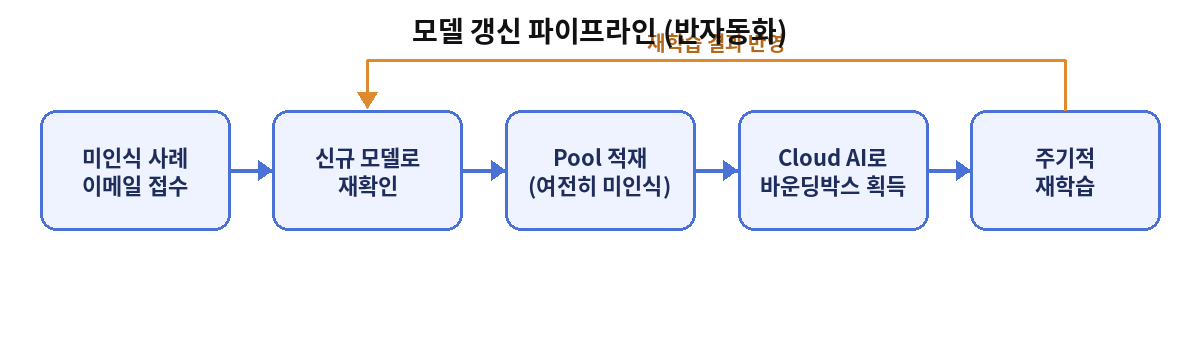
5. 모델 갱신 파이프라인 반자동화
. 인식 모델 – 한 번 만들고 끝나는 게 아니라 지속적인 데이터 수집과 재학습이 필요한 작업
. 수동 반복 대신 아래 흐름으로 파이프라인 반자동화 → 모델 갱신 시간과 수고 절감
모델 갱신 파이프라인 (반자동화)
이메일로 미인식 사례 접수
신규 모델로 재확인
그래도 인식이 안 되면 pool에 적재
Cloud AI로 바운딩 박스(경계) 획득
주기적으로 재학습
. 이 구조 덕분에 수작업 라벨링 없이도, 쌓인 미인식 데이터가 자동으로 다음 학습 사이클에 반영됨
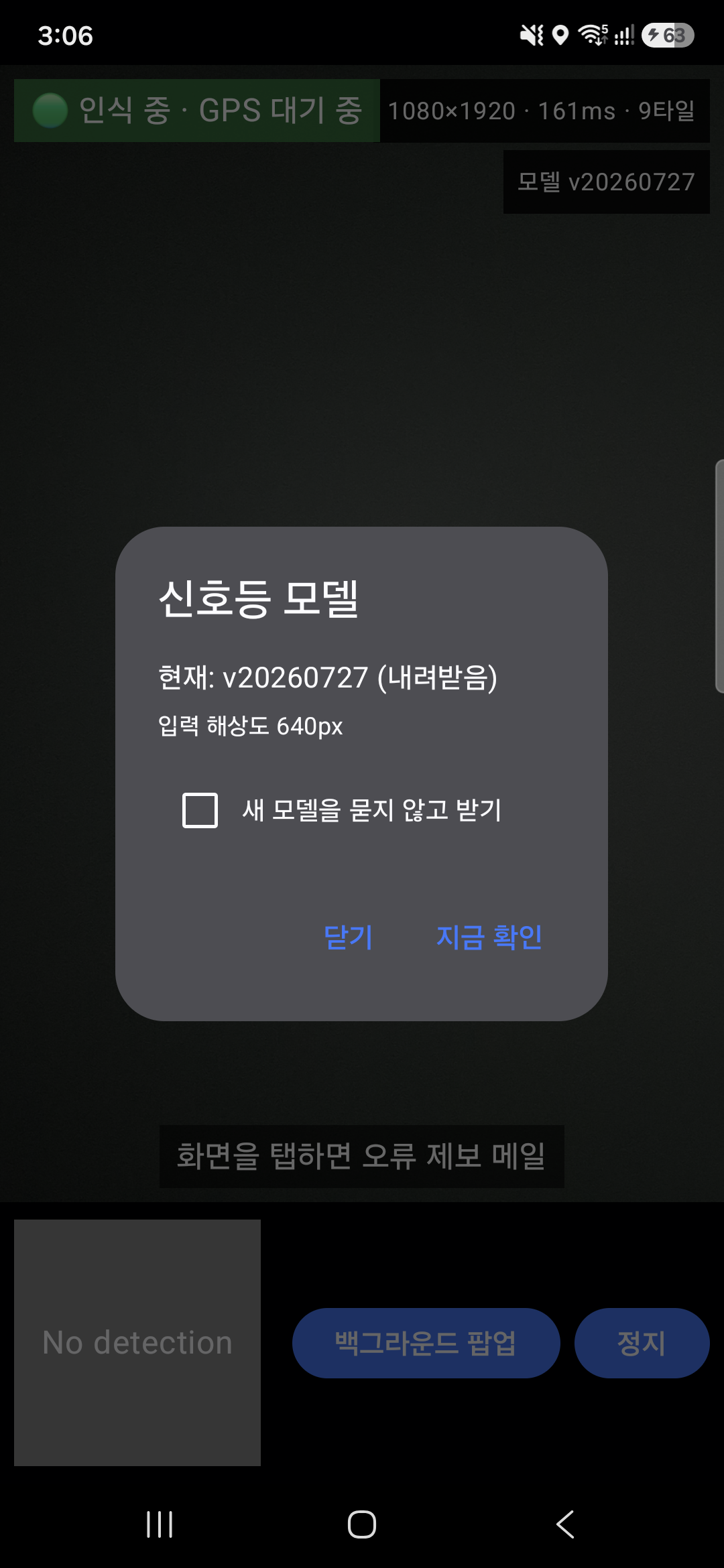
. 새 모델이 나오면 앱에서 바로 업데이트 확인 가능
새 모델 버전 안내 – 앱 내에서 바로 업데이트 확인 가능
6. 회고 – 나의 역할, 세 가지로 정리해본 리뷰
바이브코딩으로 앱 하나를 통째로 만들고 나니, “그럼 나는 이제 뭘 해야 하지?”라는 질문이 남았다. 코드를 한 줄도 안 짰다고 하면 거짓말이지만, 이번 프로젝트에서 시간을 가장 많이 쓴 곳을 돌아보니 대략 세 가지 역할로 정리가 됐다.
6.1 문제를 정의하는 역할
정지선에서 신호등이 안 보인다는 불편함을 “무엇을 해결해야 하는가”로 바꾸는 일은 AI가 대신해주지 않았다. 벤츠 사례를 참고 삼아 방향을 잡은 것도 이 단계였다.
리뷰: 문제를 명확히 정의하지 못하면, AI는 엉뚱하게 잘 만든 결과물을 내놓는다. 이 역할만큼은 아직 내 몫이라는 확신이 든다.
6.2 판단하고 검증하는 역할
AI가 내놓은 코드와 인식 결과가 실제 주행 상황에서 쓸만한지 확인하는 일. 인식 로직을 어떻게 개선할지, 데이터셋을 다시 구성할지 같은 판단도 여기서 나왔다.
리뷰: 판단 자체도 언젠가 AI가 더 잘하게 될 것 같다는 불안은 있다. 그래도 지금은, “이게 맞다/아니다”를 결정하는 감각까지 넘기고 싶지는 않다.
6.3 다음 방향을 제시하는 역할
인식률이 낮으면 왜 낮은지 파고들고, 파이프라인을 어떻게 자동화할지 방향을 제시하는 일. 코드는 AI가 짜지만, “다음엔 뭘 해야 하는가”는 매번 내가 물었다.
리뷰: 이 역할이 가장 오래 남을 것 같다는 생각이 든다. 다만 이것도 언젠가 AI가 스스로 다음 방향을 제안하게 되면, 그때는 정말로 “나는 뭘 해야 하지?”라는 질문에 다시 부딪힐 것 같다.
그래서 아직 답은 없다. 다만 이 세 가지 역할 중 어디까지가 계속 내 몫으로 남을지, 다음 프로젝트에서도 지켜보는 중이다.
7. 결론
벤츠의 ‘정지 시 카메라 UI’에서 착안 – 신호등 인식 앱 개발
바이브코딩으로 빠른 프로토타이핑
한국형 커스텀 데이터셋 구성 – 인식률 개선
파이프라인 반자동화 – 모델 갱신 부담 감소
정지선에서도 신호등이 보이게 만드는 것 – 이 한 문장이 목표였습니다.
⚠️ 본 앱은 운전 보조 도구입니다. 신호 확인과 운전 판단의 최종 책임은 항상 운전자에게 있으며, 앱 화면 주시로 인해 전방 주시가 소홀해지지 않도록 주의해 주세요.
저는 아이에게 돈을 가르칠 때 나름의 원칙이 있었습니다. 남는 자산과 사라지는 소비를 구분하는 것입니다.
게임 아이템, 콘텐츠 결제, 오락실, 인형 뽑기처럼 손에 남는 게 없는 ‘소모성·무형 지출’은 되도록 현금으로만 쓰게 했습니다. 지갑에서 지폐가 줄어드는 걸 눈으로 보게 해서, “이건 한 번 쓰면 돌아오지 않는 돈”이라는 감각을 몸에 익히게 하려는 거였죠.
이렇게만 적으면 꽤 깐깐한 부모처럼 보일지도 모르겠습니다. 하지만 저는 게임이나 아이템 구매 자체를 막는 부모는 아닙니다. 제 통제 안에서 아이에게 게임 아이템을 사준 적도 여러번 있습니다. 제가 아직 이르다고 보는 건 딱 하나, ‘아이가 마음대로 사는 것‘입니다.
그런 제가, 아이 전용 카드라는 ‘퍼핀’에서 게임 머니를 파는 것을 보고 놀랬습니다.
퍼핀은 ‘금융교육’을 표방하는 카드입니다
퍼핀은 레몬트리가 만든 7~18세 대상 선불충전카드입니다. 부모가 충전한 만큼만 쓰고, 부모가 한도를 정하고 사용 내역을 보며 관리할 수 있습니다. 회사는 “아이에게 개인금융을 가르쳐 경제적 독립을 앞당긴다”는 미션을 내세웁니다.
즉 퍼핀의 정체성은 ‘안전한 금융교육 도구’입니다. 그래서 더 묻게 됩니다.
그런데, 그 카드가 게임 머니를 ‘판다’는 것
여기서 제가 짚고 싶은 핵심은 이것입니다. 퍼핀은 단순히 아이가 어딘가에서 게임 머니를 사는 걸 ‘허용’하는 결제 수단에 그치지 않습니다. 퍼핀이라는 교육 플랫폼이, 자기 안에서 게임 머니를 직접 상품으로 진열하고 판다는 점입니다.
이 둘은 전혀 다릅니다. 아이가 자기 용돈으로 바깥 가게에서 게임 아이템을 사는 것과, ‘아이에게 올바른 금융 습관을 가르친다’는 앱이 게임 머니를 메뉴에 올려 파는 것은 의미가 다릅니다. 후자에는 “이건 사도 괜찮은 것”이라는 암묵적 권유가 깔리기 때문입니다.
게다가 제가 본 방식은 그냥 상시 판매도 아니었습니다. 예약 판매였습니다. 미리 주문을 받아 두고 정해진 날 결제하는 방식이죠. 이건 수동적으로 ‘결제만 받아주는’ 것을 넘어, 기획해서 판매를 밀어 주는 행위에 가깝습니다.
더 마음에 걸리는 건 그 판매가 항상 열려 있지도 않다는 점입니다. 마치 팝업 스토어처럼 ‘지금만’ 살 수 있게 열렸다가, 시간이 지나면 그 판매 화면 자체가 사라져 다시 보이지 않습니다. 이건 우연이 아니라 잘 알려진 영업 기법입니다. ‘지금 아니면 못 산다’는 조급함을 자극하는 한정 판매죠. 어른을 상대로도 충동구매를 끌어내려고 쓰는 방식인데, 그 대상이 충동 조절이 더 어려운 아이라면 이야기가 다릅니다. 천천히 따져보고 부모와 의논할 시간을 주기는커녕, 반대로 서두르게 만드는 구조이기 때문입니다.
금융교육을 표방하는 브랜드가 하필 게임 머니를, 그것도 이렇게 조급함을 부추기는 방식으로 파는 것이 그 미션과 어울리는 일인지 의문입니다.
게임 머니는 아이에게 ‘가장 통제가 필요한’ 소비입니다
게임 머니가 다른 소비와 똑같다면 이런 문제 제기를 하지 않았을 겁니다. 하지만 게임 머니는 충동·중독성이 가장 강한 소비 항목 중 하나입니다. 어른조차 게임 과금은 스스로 통제하기가 쉽지 않습니다.
그래서 우리 사회는 미성년자의 게임 결제에 별도의 안전장치를 두어 왔습니다. 부모 동의 없는 미성년자의 결제는 원칙적으로 취소할 수 있고, 온라인 게임은 청소년 월 결제 한도를 두는 식이죠. 그만큼 ‘아이가 게임에 쓰는 돈’은 사회가 따로 조심해 온 영역이라는 뜻입니다.
그런데 정작 ‘아이 전용’, ‘금융교육’을 내건 카드가 그 항목을 앞장서서 판다면, 방향이 거꾸로 가는 것 아닐까요. 금융교육이라면 오히려 “이런 소비는 한 번 더 생각하자“고 가르쳐야 할 대상을, 상품으로 권하고 있는 셈입니다.
‘예약 판매’와 ‘오후 2시 취소’라는 구조
판매 방식에서 가장 마음에 걸렸던 부분은 취소 구조입니다. 제가 겪은 흐름은 이랬습니다.
미리 예약 판매를 받아 둡니다.
월요일 아침(8~9시쯤)에 결제가 이루어집니다. 이때 비로소 부모가 인지할 수 있습니다.
그런데 취소는 그날 오후 2시까지 보호자가 직접 요청해야 합니다.
문제는 그 시간대입니다. 오후 2시면 아이는 학교에 있는 시간입니다. 결국 부모는 아이와 상의할 틈도 없이, 혼자 짧은 시간 안에 결정해야 합니다. 의도가 무엇이든, 결과적으로 ‘부모와 자녀가 함께 판단하는 과정’을 건너뛰게 만드는 구조처럼 보입니다.
저는 의사결정 자체가 나쁘다고 말하는 게 아닙니다. 오히려 반대입니다. 금융교육이 목적이라면, 이런 소비야말로 아이와 함께 “이거 정말 살까?”를 이야기해 볼 가장 좋은 기회입니다. 그 대화의 창을 닫아 버리는 듯한 타이밍 설계가 아쉽습니다.
“용돈 한도 안이라 괜찮다”는 답으로 충분할까요
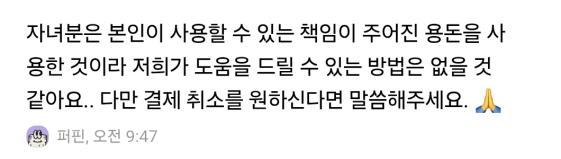
이 문제를 제기했을 때 돌아온 답의 취지는 “아이에게 책임이 주어진 용돈 한도 안에서 쓴 것이라 괜찮다“는 것이었습니다.
법적으로 근거가 아예 없는 말은 아닙니다. 민법은 부모가 범위를 정해 처분을 허락한 재산은 미성년자가 스스로 쓸 수 있다고 봅니다. 한도·실시간 알림·취소 창구를 제공하는 점도, 통제 없는 외부 결제보다는 분명히 안전장치가 많습니다.
그런데 그게 면죄부가 되지는 않는다고 생각합니다. 핵심은 “한도 안에서 썼느냐”가 아니라 “교육을 표방하는 플랫폼이 그 항목을 직접 파는 게 맞느냐“이기 때문입니다. “용돈 한도 안이라 괜찮다”는 답은, 가장 조심해야 할 소비에 대한 책임을 개별 용돈 한도 뒤로 미뤄 두는 답변으로 들립니다. 한도는 부모가 정한 것이지, 회사가 무엇을 파느냐에 대한 정당화가 될 수는 없습니다.
한 가지 덧붙이자면 — ‘핀번호’라는 형태
곁가지로 한 가지만 짚겠습니다. 게임 머니가 양도·환전이 자유로운 핀(PIN) 번호 형태라면 우려는 더 커집니다. 통신사조차 청소년에게는 데이터 선물을 막아 두는데, 핀번호는 그보다 더 현금에 가깝게 거래될 수 있기 때문입니다. 다만 이건 부차적인 논점이고, 제가 정말 묻고 싶은 건 형태 이전에 ‘게임 머니를 미성년자에게 파는 것 자체‘입니다.
교육이라는 간판을 떼든지, 게임 머니를 내리든지
정리하겠습니다. 저는 아이의 자율성에 반대하는 부모가 아닙니다. 제 통제 아래에서 게임 아이템을 사준 적도 있습니다. 문제는 자율성이 아니라, 금융교육을 내건 플랫폼이 충동성이 가장 큰 소비를 직접 상품으로 진열하고, ‘지금만 산다’는 한정 판매로 조급함까지 부추긴다는 것입니다.
그렇게 서두르게 만들어 놓고, 정작 부모가 들여다볼 시간은 어정쩡하게 잘라 둡니다. 사라고 재촉할 때는 적극적이면서, 다시 생각할 시간 앞에서는 인색한 셈입니다. 그러면서 “용돈 한도 안이라 괜찮다”는 말로 책임을 비껴갑니다. 한도는 부모가 정한 것이지, 회사가 무엇을 파느냐에 대한 변명이 될 수 없습니다.
저는 묻고 싶습니다. 이게 아이를 위한 교육입니까, 아니면 아이를 향한 영업입니까. 둘은 같이 갈 수 없습니다. ‘아이에게 돈을 가르친다’는 간판을 내걸 거라면 게임 머니부터 내려야 하고, 게임 머니를 계속 팔 거라면 교육이라는 간판을 떼는 게 정직합니다. 적어도 게임 머니 같은 항목은 부모가 건건이 직접 승인하게 하고, 부모가 충분히 검토할 시간을 보장하는 것 — 이건 양보할 수 없는 최소한입니다.
아이의 지갑을 노리는 어른은 이미 세상에 충분히 많습니다. 적어도 ‘아이 전용’이라는 이름을 단 카드만큼은, 그 줄에 서지 않기를 바랍니다.
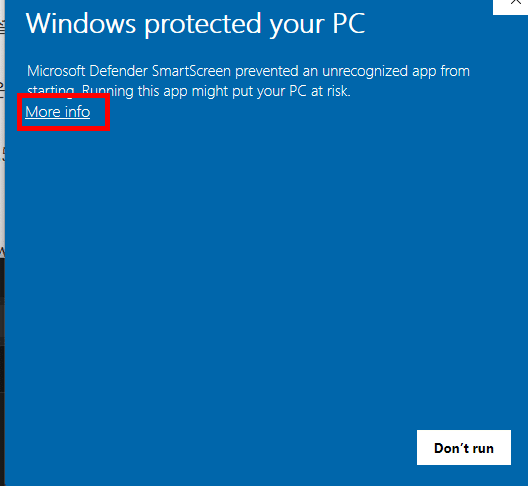
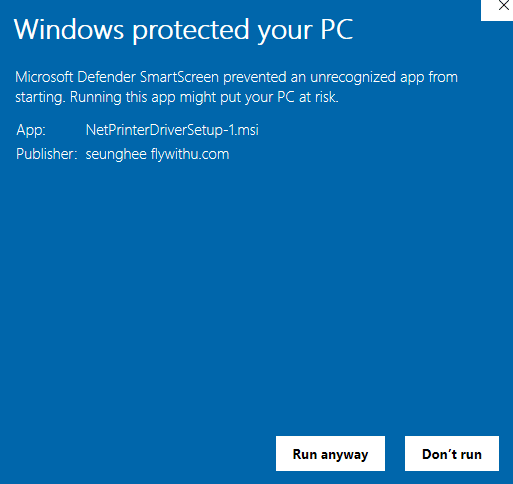
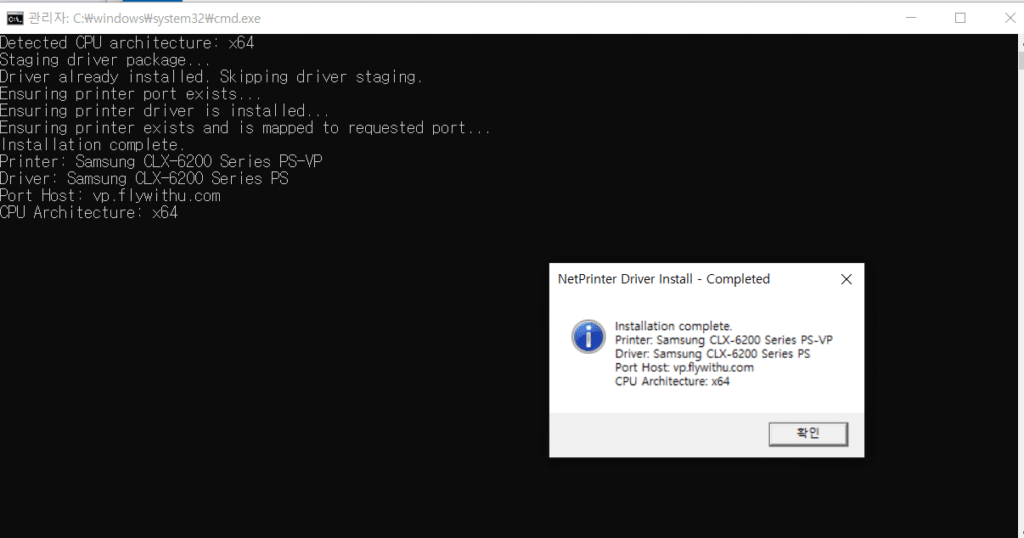
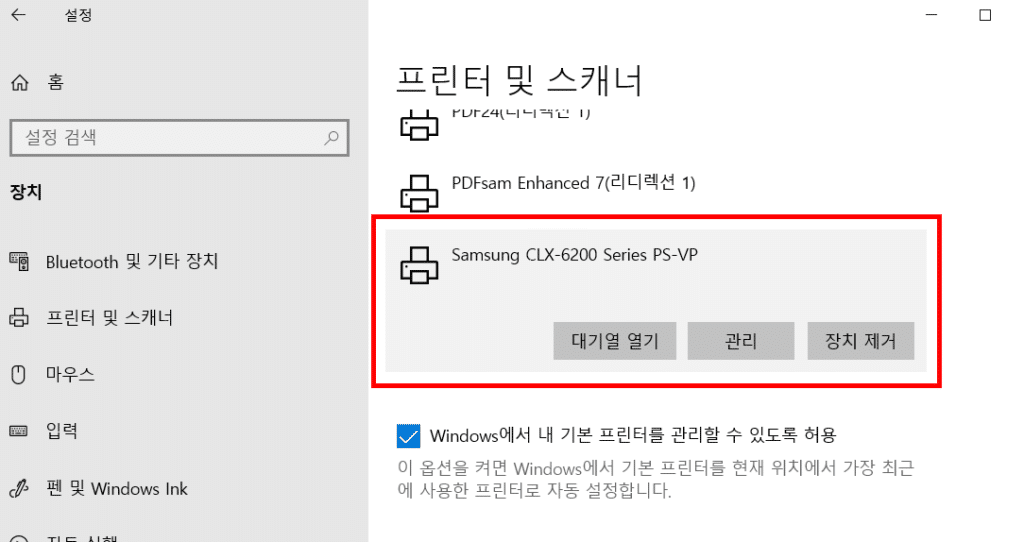
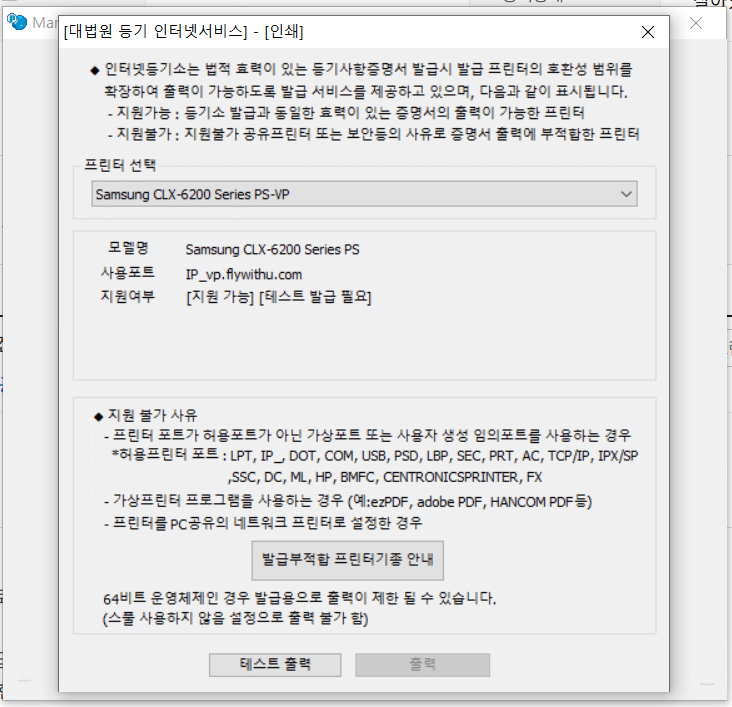
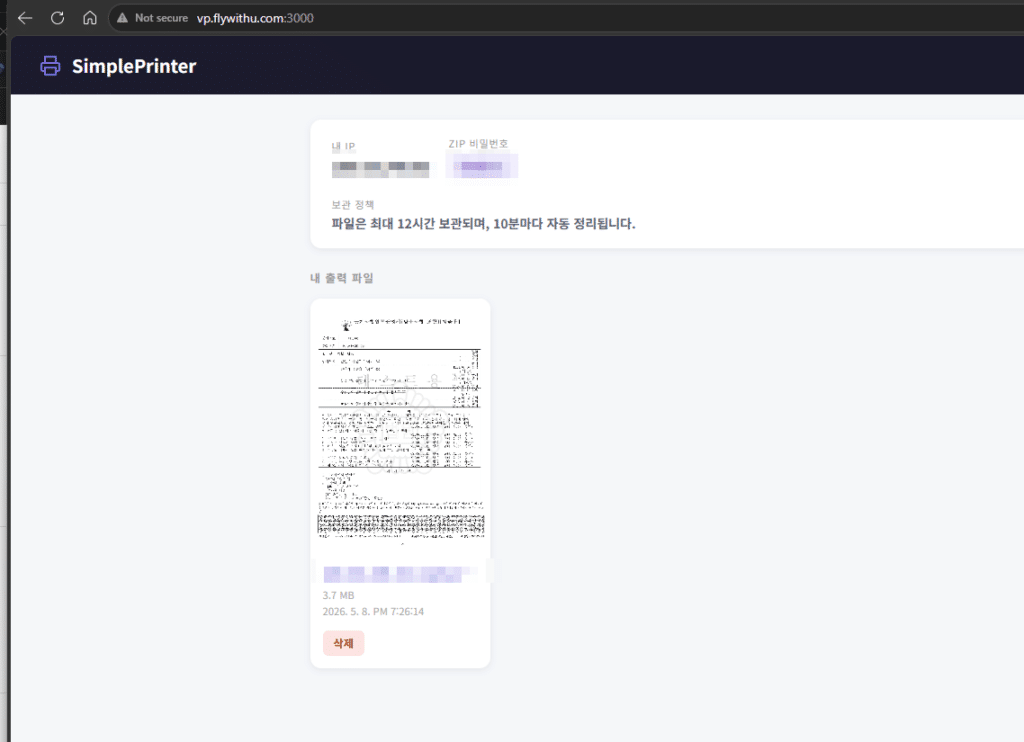
사용 메뉴얼은 기존과 동일합니다. 단 ipv4 (집에서 인터넷) 환경이 안정적입니다. 핸드폰 테더링은 계속 ip주소가 변경이 됩니다. 다만 프린터 드라이버의 서버 주소를 vp.flywithu.com 으로 변경해 주시길 요청드립니다. 기존 주소도 사용은 가능하지만, DNS 캐싱 등으로 인한 예기치 않은 오류를 줄이기 위해 새로운 주소로 설정해 주시는 것을 권장드립니다.
설치 및 사용에 대한 자세한 내용은 기존 Virtual Print 메뉴얼 글을 그대로 참고하시면 됩니다.
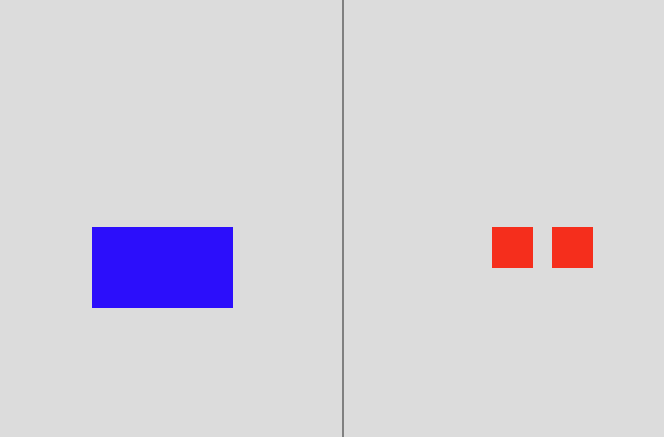
a. 일차 설계 왼쪽에 1개, 오른쪽에 2개를 놓아보았다. 그리고 물었더니 왼쪽/오른쪽 너무 잘 대답해준다.
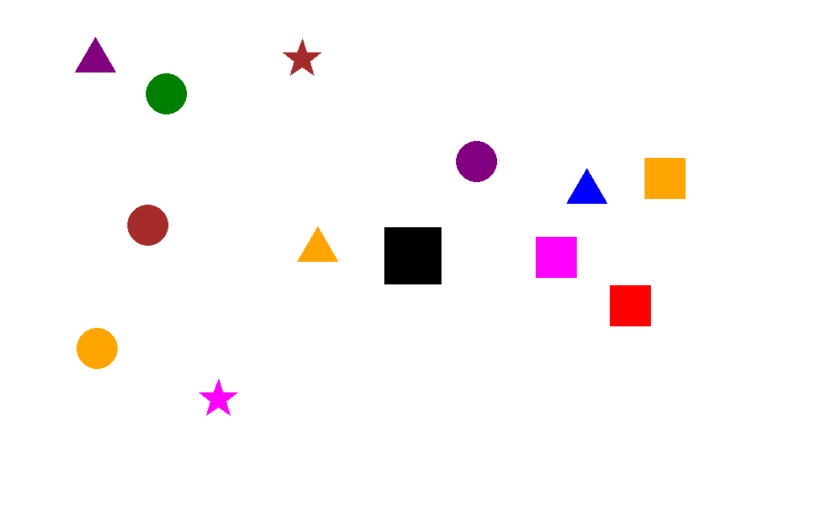
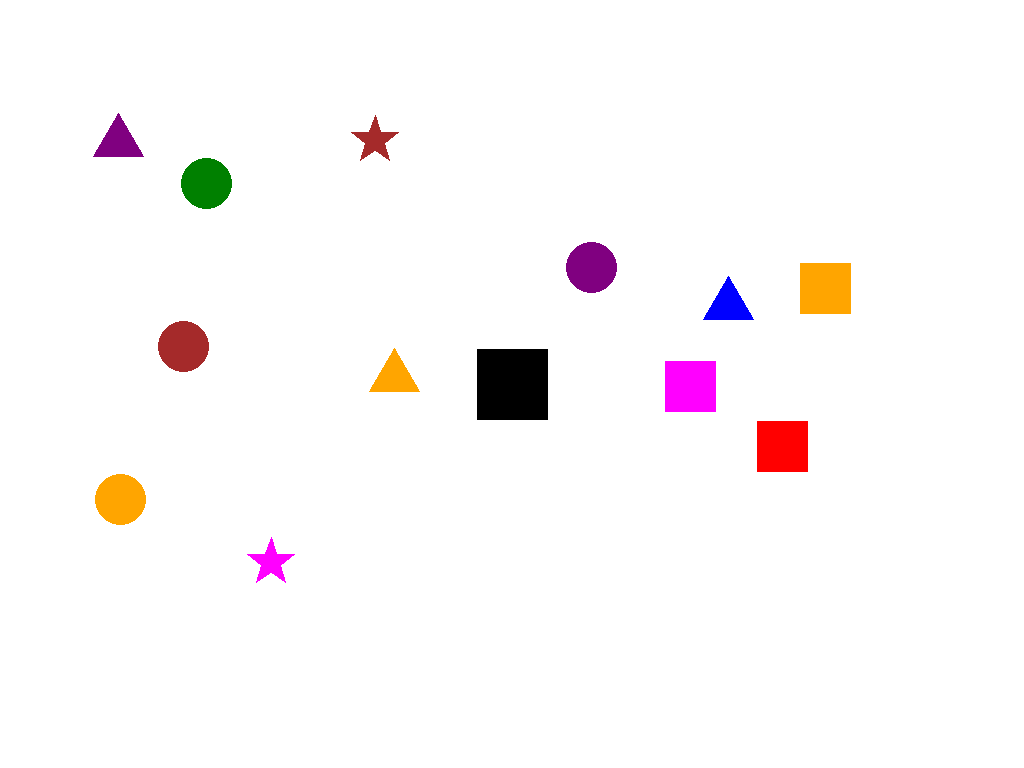
b. 최종 설계 아래 프롬프트와 같이, 가운데 블랙 박스를 놓고 그것을 기점으로 좌우를 비교 해달라고 했다. 블랙스퀘어 위아래 방향으로는 Deadzone을 놓아서, 좌우를 좀 더 명확하게 만들었다. 결과는 Qwen은 정답률이 30%대까지 낮아졌다. 이제 Cloud VLM을 사용해볼만하다고 생각했다.
prompt = (
        "Look at the black square in the center. "
        "Count every single individual colored object on its LEFT side and every single individual colored object on its RIGHT side. "
        "Which side has more total objects? Answer 'left', 'right', or 'equal' only."
    )
b.1 설계 의사 결정 근거
검은박스: 1차 테스트에서 왼쪽/오른쪽을 너무 잘 맞혔다. 문제를 어렵게 하기 위해 명확한 기준점(검은 박스)를 중앙에 배치했다. 이렇게 하니 Qwen의 정답률이 30%로 급락했다.
Deadzone: 블랙박스 위아래를 완전히 비워서 오직 좌우만 비교 하도록 강제
최종 테스트 이미지 예시 – 모든 테스트 이미지는 본 블로그 최하단에 있습니다.
2. 테스트 모델
복수 모델 테스트 가능한 Lightning.AI API이용
매달 Credit 을 주고 있고, 자체 SDK 도 지원
Grok이 없어서 아쉬움 – 자율주행에 최적화된 Tesla의 Grok은 좌우 인식에 최적화되었을 가능성이 높다.
GPT 5.2, Gemini 2.5/3.5 Pro, Claude Sonnet 4.5 선택
3. 1차 테스트 결과
Gemini vs. GPT
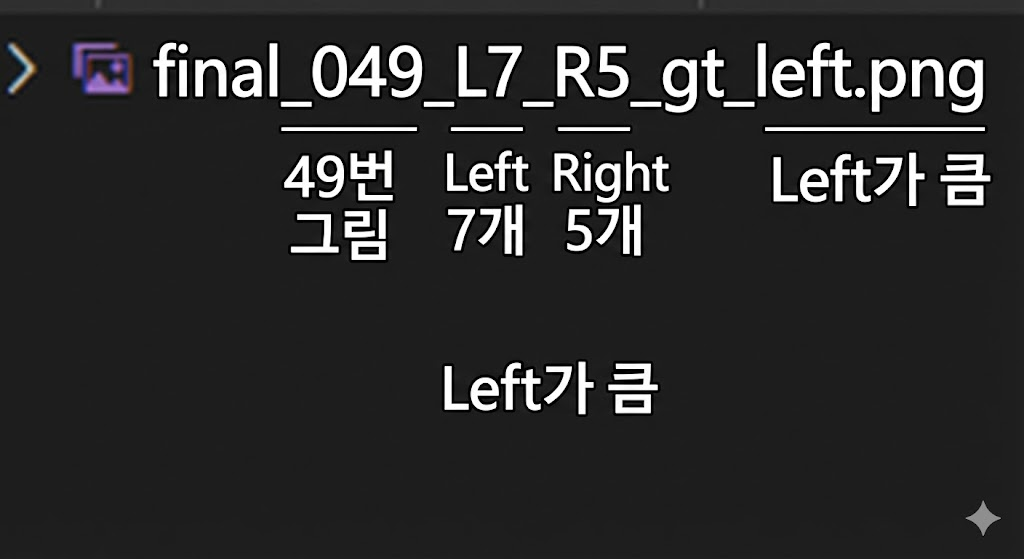
파일 이름의 의미는 아래와 같다. 왼쪽 7개, 오른쪽 5개, 왼쪽이 큼.
Claude 의 답 – left/right로 답변하라는데 저렇게 장황하게 답변을 한다. 그냥 알아서 매우 자세하게 분석해서 답변을 한다. 이래서 Claude가 코딩을 잘하나.
    "final_000_L8_R4_gt_left.png": {
        "filename": "final_000_L8_R4_gt_left.png",
        "gt": "left",
        "pred": "left",
        "correct": true,
        "full_response": "I need to identify the black square in the center and count the colored objects on each side.\n\nThe black square is located in the center of the image.\n\n**Objects on the LEFT side of the black square:**\n1. Purple star (top left)\n2. Magenta/pink star (upper center-left)\n3. Red star (upper center-left, below the magenta star)\n4. Blue star (center-left)\n5. Red star (left side)\n6. Blue circle (below and left of black square)\n7. Red circle (below and left of black square)\n8. Red circle (below and left of black square, lowest)\n\nTotal on left: 8 objects\n\n**Objects on the RIGHT side of the black square:**\n1. Cyan star (upper right)\n2. Magenta square (upper right)\n3. Purple square (right of black square)\n4. Purple triangle (lower right)\n\nTotal on right: 4 objects\n\n**Answer: left**"
    },
Gemini 3.5의 답 – Claude 처럼 분석적으로 문제를 푼다. 그러나 난 left/right 로 답하라 했는데.
    "final_000_L8_R4_gt_left.png": {
        "filename": "final_000_L8_R4_gt_left.png",
        "gt": "left",
        "pred": "left",
        "correct": true,
        "full_response": "To determine which side has more objects, let's count them relative to the central black square.\n\n**Left Side Objects:**\n1.  Purple star (top left)\n2.  Pink star (top, slightly left of center)\n3.  Red star (middle left)\n4.  Blue star (middle left)\n5.  Red star (middle left, lower than blue one)\n6.  Blue circle (below the stars)\n7.  Red circle (bottom left)\n8.  Red circle (bottom left, lowest one)\n\nTotal on the left: **8**\n\n**Right Side Objects:**\n1.  Cyan star (top right)\n2.  Magenta square (top right)\n3.  Purple square (middle right)\n4.  Purple triangle (bottom right)\n\nTotal on the right: **4**\n\nComparing the two counts (8 vs 4), the left side has more objects.\n\nleft"
    },
동일함 이미지와 동일한 Prompt에서 모델별 성능차이가 많았다. Claude 와 Gemini3.5 는 주절주절 말해서 탈락 시켰다. 난 분명히 ‘Answer ‘left’, ‘right’, or ‘equal’ only.’ 라고 말했다. 이러한 포맷 정확성/유지는 특히 자동화에서 매우 중요하다.
총 96개의 이미지를 테스트했고, Gemini는 91점, Gpt는 48점으로 Double Score의 차이가 났다. 단 추론 시간은 Gemini가 GPT 대비 느렸다. 어쩌면 내부적으로 CoT를 돌리고 결론만 응답했을 수도 있다.
GPT실패한 사유를 보면 좌우를 잘못 보았다고 보기는 어려웠다. 이렇게 left/right 가 바뀌었다기 보다 equal로 (인식 자체를 오류)인 경우가 많았다.
GPT 5.0은 Text 전용 모델이었다. 이 모델에 Vision만 ‘추가’한 형태이지 않을까. 그러다 보니 Vision이 약할 수 있다.
4. 2차 테스트
사실 2차 테스트는 1차 결과를 상세 분석을 안하고, GPT 가 틀린 것이 많다는 결과만 보고 진행했다. 이때는 GPT가 좌우를 인식을 잘못 한 거라고 생각하고 새롭게 테스트를 했다.
Gemini 3.5나 Claude 의 답변을 참고해서, 아래 프롬프트처럼 카운트를 하게 했다. 이렇게 했을 때 91%수준으로 급격한 결과 상승을 했다. 그러나 이것은 내가 설계한 실험 방향과 달랐다.
     prompt = (
     "Look at the black square in the center. "
     "Count every single individual colored object on its LEFT side and every single individual colored object on its RIGHT side. "
     "Determine which side has more objects.\n\n"
    "Return ONLY in the following format:\n"
     "<side> <number>\n\n"
     "Where:\n"
     "- <side> is exactly one of: left, right, equal\n"
     "- <number> is the absolute difference in object counts\n"
     "- If both sides have the same number, return: equal 0\n\n"
     "Do not include any extra text or explanation."
 )
5. 3차 테스트
모델이 이미지를 오독한 게 아니라, 좌우를 오인식 했다는 것을 어떻게 알 수 있을까. 한참 고민을 한 끝에 아래와 같이 프롬프트를 만들었다. 절대적으로 카운트 하는 것이 아니라 어느쪽이 얼마나 크냐? 로 상대적인 것을 물었다. 이렇게 하면 좌우를 잘못 판단하고, 카운트는 제대로 한 것의 유무를 알 수 있을 것이라 생각했다. 이렇게 했을 때는 소폭 상승한 62점을 맞았다.
prompt = ( "Look at the black square in the center. " "Count every single individual colored object on its LEFT side and every single individual colored object on its RIGHT side. " "Determine which side has more objects.\n\n" "Return ONLY in the following format:\n" "<side> <number>\n\n" "Where:\n" "- <side> is exactly one of: left, right, equal\n" "- <number> is the absolute difference in object counts\n" "- If both sides have the same number, return: equal 0\n\n" "Do not include any extra text or explanation.")
아래는 테스트 결과이다.
왼쪽 5개, 오른쪽 6개로 실제로 오른쪽이 많으나, 결과는 왼쪽이 1개 더 많다고 나왔다. 2개를 잘못 카운트 한것이 아니라면, 좌우 오류로 볼 수 있다.